Cheapest Sora 2 API in 2026: $0.08 Per Video + Full Tutorial & Character Consistency Guide
Notification! Sora2 recently adjusted a set of rules, requiring phone number binding for verification. GrsAi has completely solved this problem, improving the video success rate!
Confused by the Sora2 API documentation? How exactly to call it? Can you upload real people to create characters? What are the uses of the 3 different APIs? How is it charged?
This article will introduce in detail the source supplier of GrsAI API, providing the usage methods of the three core video generation interfaces, helping developers quickly access the powerful Sora 2 video generation capability at 0.08 per clip. At the end of the article, there is also a tutorial for ordinary users! Keep reading.
We will focus on the specific usage methods and restrictions of the Sora2 video interface, upload character interface, and create character from original video interface.
I. GrsAI API Access Preparation
GrsAI (Grsai.com) is an API service platform focused on aggregating mainstream AI large models. All models are provided directly from the source without middlemen taking a cut. Therefore, it can provide model calling services at prices lower than official channels and the market, such as Sora2 — — $0.08 per clip, Nano Banana Pro — — $0.09 per image, Nano banana — — $0.22 per image, Gpt image 1.5 — — $0.02 per image, Veo3.0/Veo3.1 — — $0.4 per clip, Gemini2.5, Gemini3….. It also supports high concurrent requests, suitable for batch tasks and high-traffic products. Failures do not deduct credits and are refunded instantly, and it provides both China direct connection and overseas access nodes, convenient for global users with low latency access.

Get API Key
API Key is your credential for calling all GrsAI interfaces and must be carried in the Header of each request. Please save it properly and do not leak it.
(1) Enter GrsAI console: https://grsai.com/dashboard/api-keys
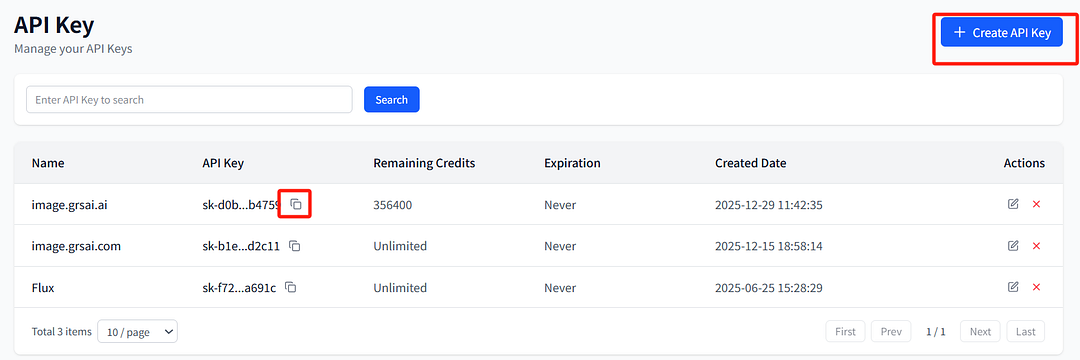
(2) Generate API Key: Click the “Create” button, name the key and optionally set a quota limit, then copy it after generation for use.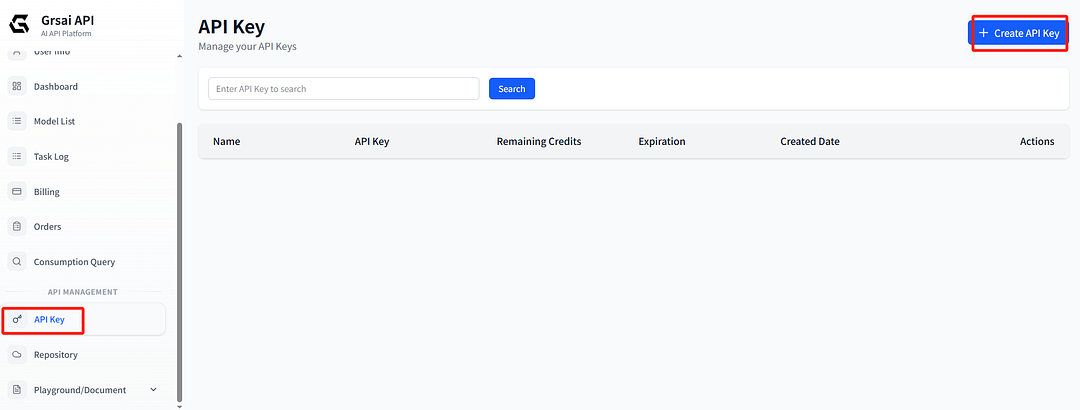
Configure Request Header
Add the following information in the HTTP request Header:
{
  "Content-Type": "application/json",
  "Authorization": "Bearer apikey"
}
Please replace <API Key> with the actual key string you obtained from the console.
II. GrsAI Sora 2 API Documentation Details
1.Sora2 Video Generation Interface
Interface Basic Information
- Interface path: /v1/video/sora-video
- Request method: POST
- Service addresses:
China direct connection: https://grsai.dakka.com.cn
Overseas: https://grsaiapi.com
Core Functions
The Sora2 video interface can generate high-quality videos based on text prompts or reference images. You can use this interface for:
- Pure text to generate video
- Image + text combination to generate video
- Prompt @character_id to reference character for video creation
- Remix to make video sequels
- Generate videos with specified aspect ratio and duration
Remix Secondary Creation
Remix (remix/remake) allows you to modify or continue based on an existing Sora-generated video (requires Pid), by inputting a new prompt, without regenerating the entire video from scratch.
The core parameter is remixTargetId, reference the pid value in results: s_xxxxxxxxx

Add remixTargetId parameter, fill in the original video’s ID

Request Parameter Details
Required parameters:
{
  "model": "sora-2",
  "prompt": "prompt" # Reference character here with @id
}
Optional parameters:
- url: Reference image URL or Base64 encoding (image-to-video function)
- aspectRatio: Video aspect ratio, supports “9:16” (vertical) and “16:9” (horizontal), default 9:16
- duration: Video duration, optional 10 seconds or 15 seconds, default 10 seconds
- remixTargetId: Sequel video pid, used for making video sequels
- size: Video clarity, “small” or “large”, default small
Notes
- Prohibited to generate real-person videos: This interface does not support generating real-person video content
- Using characters: If you need to use the character function, please use the independent character upload interface, then reference with @character_id format in the prompt
Response Handling Methods
This interface supports three ways to obtain results:
- Streaming response (default): Returns generation progress and results in real time
- Webhook callback: Set webHook parameter, the system will POST callback to your server
- Polling method: Set webHook parameter to “-1”, immediately return task ID, then use /v1/draw/result interface to poll for results
Successful Response Example
{
  "id": "f44bcf50-f2d0-4c26-a467-26f2014a771b",
  "results": [{
    "url": "https://example.com/example.mp4",
    "removeWatermark": true,
    "pid": "s_xxxxxxxxxxxxxxx"
  }],
  "progress": 100,
  "status": "succeeded"
}
Usage Example: Generate Cat Video
// Request example
const response = await fetch('https://grsai.dakka.com.cn/v1/video/sora-video', {
  method: 'POST',
  headers: {
    'Content-Type': 'application/json',
    'Authorization': 'Bearer apikey'
  },
  body: JSON.stringify({
    "model": "sora-2",
    "prompt": "A cute cartoon cat playing with a ball of yarn on a sunny day",
    "aspectRatio": "16:9",
    "duration": 10,
    "size": "small"
  })
});
2.Upload Character Interface
Interface Basic Information
- Interface path: /v1/video/sora-upload-character
- Request method: POST
Core Functions
Upload character video material for referencing in subsequent video generations. The character function allows you to maintain character consistency across different videos.
Important Rules
- Prohibited to upload real-person videos: Only cartoon, anime, etc., non-real characters can be uploaded
- Video clip restriction: Use timestamps parameter to specify valid clip within 3 seconds, format “start seconds,end seconds”
- Upload once, use multiple times: After successful character upload, it can be reused in all subsequent video generations, reference with @character_id in prompt
Request Parameters
{
  "url": "character video URL or Base64",
  "timestamps": "0,3"
}
Character Reference Method
- After successful upload, the character_id in the response is the character ID
- In the Sora2 video generation interface prompt, use @character_id format to reference the character
- For example: If character_id is “cat_character”, then the prompt should be: “A @cat_character jumping in the garden”

Usage Flow
- Upload character video to get character_id
- Reference the character in the prompt when generating video
Example: Upload and Use Character
// 1. Upload character
const uploadResponse = await fetch('https://grsai.dakka.com.cn/v1/video/sora-upload-character', {
  method: 'POST',
  headers: {
    'Content-Type': 'application/json',
    'Authorization': 'Bearer apikey'
  },
  body: JSON.stringify({
    "url": "https://example.com/cartoon-cat.mp4",
    "timestamps": "0,3"
  })
});
const characterData = await uploadResponse.json();
const characterId = characterData.results[0].character_id; // For example: "cartoon_cat_001"

// 2. Use character to generate video
const videoResponse = await fetch('https://grsai.dakka.com.cn/v1/video/sora-video', {
  method: 'POST',
  headers: {
    'Content-Type': 'application/json',
    'Authorization': 'Bearer apikey'
  },
  body: JSON.stringify({
    "model": "sora-2",
    "prompt": `A ${characterId} exploring a magical forest with glowing mushrooms`,
    "aspectRatio": "16:9"
  })
});
3.Create Character from Original Video Interface
Interface Basic Information
- Interface path: /v1/video/sora-create-character
- Request method: POST
Core Functions
Extract character from AI-generated video to create reusable character resource. This is the second way to create characters.
Featured Functions
- Supports AI-generated real-human characters: Can create real-human characters from AI-generated videos
- Precise extraction: Use timestamps parameter to specify specific clip in the video
- Associated with original video: Requires providing the original video’s pid (video ID)
Request Parameters
{
  "pid": "s_xxxxxxxxxxxxxxx",
  "timestamps": "0,3"
}
Usage Scenarios
- Create character from already generated video (including Sora2 platform videos, get Pid to create)
- Create character series videos, maintain character consistency
- Create derivative content for popular characters

Workflow
- First generate original video, get the video’s pid
- Select a 3-second character clip from the original video
- Call create character interface to extract character
- After getting character_id, reference it in subsequent videos

Example: Create Character from Generated Video
// Assume there is already a generated video with pid "s_6964a407c1fc819198458b8abf2b9cdf"

// 1. Create character from video
const createCharResponse = await fetch('https://grsai.dakka.com.cn/v1/video/sora-create-character', {
  method: 'POST',
  headers: {
    'Content-Type': 'application/json',
    'Authorization': 'Bearer apikey'
  },
  body: JSON.stringify({
    "pid": "s_6964a407c1fc819198458b8abf2b9cdf",
    "timestamps": "2,5"  // Extract character from 2-5 seconds
  })
});
const newCharacter = await createCharResponse.json();
const newCharacterId = newCharacter.results[0].character_id;
// 2. Use the new created character to generate new video
const newVideoResponse = await fetch('https://grsai.dakka.com.cn/v1/video/sora-video', {
  method: 'POST',
  headers: {
    'Content-Type': 'application/json',
    'Authorization': 'Bearer apikey'
  },
  body: JSON.stringify({
    "model": "sora-2",
    "prompt": `The @${newCharacterId} is now attending a grand feast in a castle`, //@character_id
    "aspectRatio": "16:9"
  })
});
IV. Result Acquisition Interface
Polling Interface
- Interface path: /v1/draw/result
- Request method: POST
When webHook parameter is set to “-1”, you can use this interface to poll task status:
const resultResponse = await fetch('https://grsai.dakka.com.cn/v1/draw/result', {
  method: 'POST',
  headers: {
    'Content-Type': 'application/json',
    'Authorization': 'Bearer apikey'
  },
  body: JSON.stringify({
    "id": "task ID"
  })
});
V. Sora2 Charging Standard
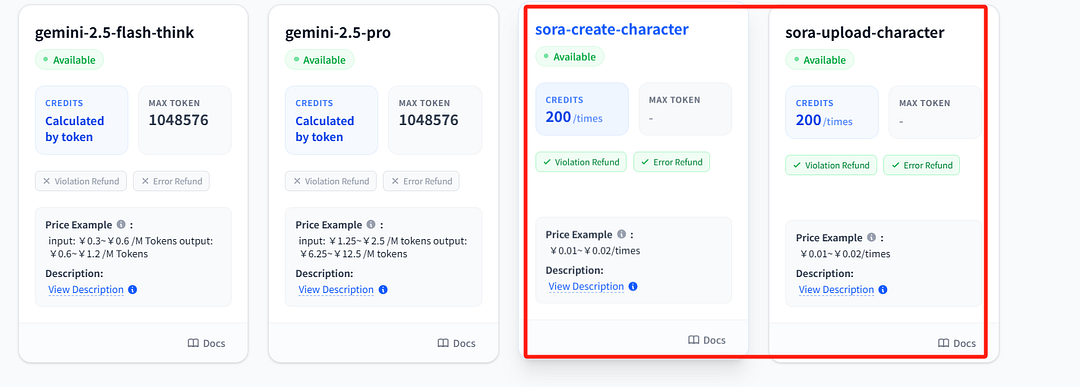
Sora2 Video Generation API — — $0.08 per clip, Sora2 Character Upload API — — $0.01 per clip, Sora2 Create Character from Original Video API — — $0.01 per clip.
VI. Sora2 Batch Image Generator
A batch image generator provided by Grsai. Each video costs $0.08 and there’s no limit to the number of times it can be generated.
Sora2 Batch Image Generator: https://image.grsai.com/
Operation Guide:
- In GrsAI console: https://grsai.com/dashboard/api-keys Get API Key, new users have basic quota 5000 for free use
- In batch generation tool: https://image.grsai.com/ Bind API Key in the upper right corner
- Select Sora2 model to use
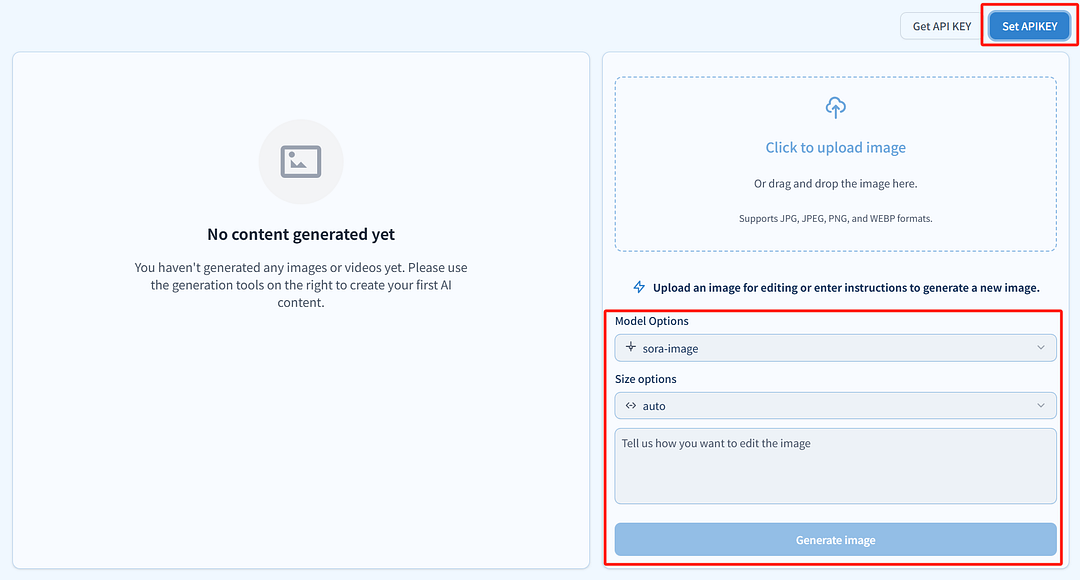
GrsAI batch generation tool can use Nano banana pro, Nano banana, Sora2, Veo and other models, no generation quantity limit, batch pack download, suitable for batch card drawing users, generation failures do not deduct fees! Ordinary users can use API for lowest price model access.
Note: Generated content is only saved for 2 hours, please download promptly.
Summary
When integrating GrsAI’s Sora-2 API interfaces, please note! It does not support generating real-person videos or creating characters directly. If you need to use real-person images, first use the “video generation interface” with prompt to generate character video, then use “create character from original video interface” to get character_id, finally reference @character_id in the “video generation interface” prompt. After successful character creation, no need to upload repeatedly. Failures refund credits instantly, use with confidence.
By reasonably combining these three interfaces, you can build complex video generation applications, maintain character consistency, and create serialized video content.


评论
发表评论