Stable AI API Proxy for Developers: GPT Image 1.5 via GrsAI ($0.02/Image)
GPT Image 1.5 Model Introduction
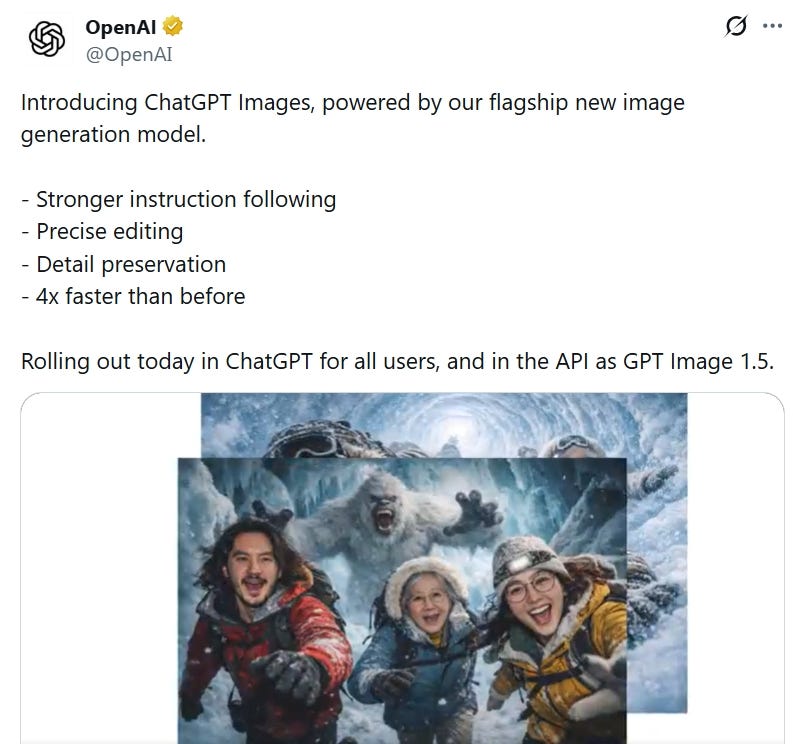
GPT Image 1.5 is OpenAI’s latest flagship image generation model released in December 2025. It is a major upgrade version following the previous model. It has achieved significant progress in image generation quality, prompt adherence, precise editing capabilities, and text rendering.
Main highlights include:
- Stronger prompt adherence: Better understanding of complex instructions, generating results more aligned with user descriptions.
- Precise image editing: Supports retaining key details (such as facial features, logos, etc.) during iterative editing, avoiding unrelated changes.
- Improved text rendering: Handles dense and small font text better, suitable for generating posters, UI designs, and other scenarios.
- Faster generation speed: Up to 4 times faster compared to the previous model, supporting smoother iterative creation.
- Lower API costs: Image generation and editing costs reduced by about 20%.
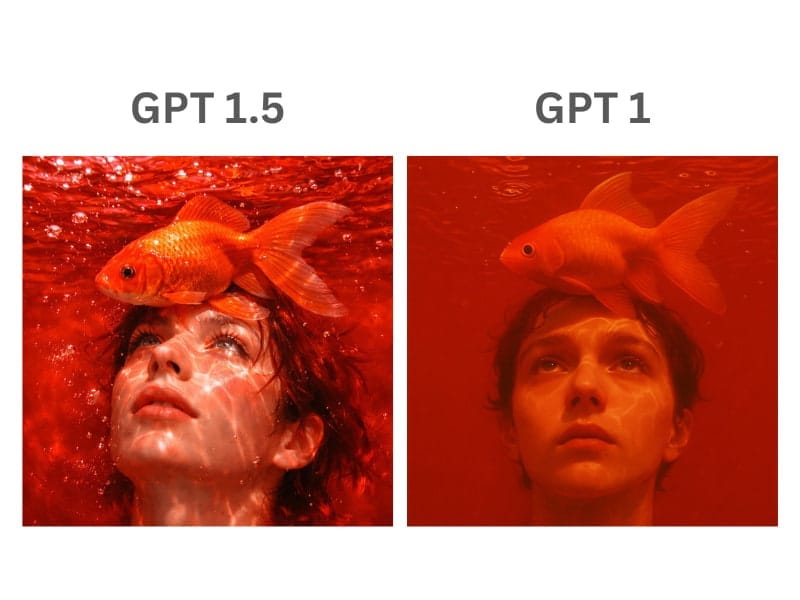
This model is suitable for professional design, marketing materials, product visualization, and other scenarios, and is available in the OpenAI API with the model name gpt-image-1.5.
Ordinary users can directly access the official website for free use: 1.https://openai.com/index/new-chatgpt-images-is-here/
OpenAI API Access Method
OpenAI officially provides the standard Images API interface for calling GPT Image 1.5 to generate images.
Official documentation: https://platform.openai.com/
API endpoint:
POST https://api.openai.com/v1/images/generationsRequest headers:
Authorization: Bearer YOUR_API_KEY
Content-Type: application/json
Request parameters (JSON):
{
  "model": "gpt-image-1.5",  // Specify the model
  "prompt": "A cute cat playing on the grass, high-definition realistic style",
  "n": 1,                    // Number of images to generate (1-4)
  "size": "1024x1024",       // Optional sizes: 1024x1024, 1024x1792, etc.
  "quality": "high",         // Optional: standard or high
  "style": "vivid"           // Optional: vivid or natural (supported by some models)
}
Response example: Returns image URL (limited validity period) or base64 data. Python practical code (using openai library):
from openai import OpenAI
client = OpenAI(api_key="your_openai_api_key")
response = client.images.generate(
    model="gpt-image-1.5",
    prompt="A cute cat playing on the grass",
    size="1024x1024",
    n=1)
image_url = response.data[0].url
print(image_url)
Official access is stable and reliable, but requires an OpenAI API Key, and costs are billed directly according to official rates.
OpenAI GPT Image 1.5 API Pricing OpenAI image generation pricing depends on the quality level (determining clarity and details) and size/ratio (determining pixel count):
Low quality (low):
- Square 1024×1024: $0.009
- Non-square 1024×1536 or 1536×1024: $0.013
Medium quality (medium):
- Square 1024×1024: $0.034
- Non-square 1024×1536 or 1536×1024: $0.05
High quality (high):
- Square 1024×1024: $0.133
- Non-square 1024×1536 or 1536×1024: $0.20
The lowest is $0.009 per image, the most expensive up to $0.20 per image!

GrsAi-Ai ——AI Proxy
GrsAI API is an AI large model API source supply platform(AI Proxy). If you find the official API costs high and want to find low-cost and high-stability options, it is the most suitable for you.
- Prices far lower than official: Highest quality images around $0.02 per image (extra images in batch generation only consume 50 credits).
- Domestic direct connection more stable: Provides domestic and overseas dual nodes for free choice, fast access speed, high stability, supports high concurrency.
- Rich model selection: One-stop access to multiple advanced image generation models, current models on the platform include:
GPT-4o — — $0.02/image
Nano Banana — — $0.022/image
Nano Banana Pro — $0.09/image
Sora2 — — $0.08/video
Veo3.1 / Veo3.0 — — $0.4/video
Gemini3.1 etc.
- Complete functions: Supports streaming response, Webhook callback, progress query, multiple reference image URLs, batch generation, and other advanced features.
- No deduction for failures: No deduction for failures regardless of the reason, credits refunded instantly.
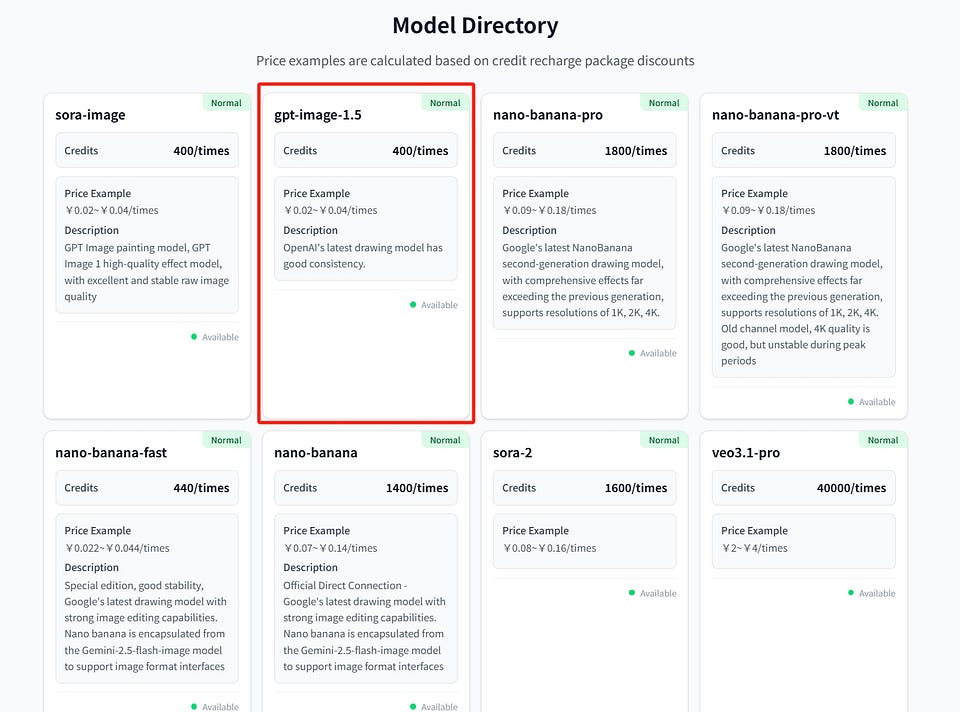
More model details and latest pricing, please directly view the GrsAI console model list: https://grsai.com/dashboard/models
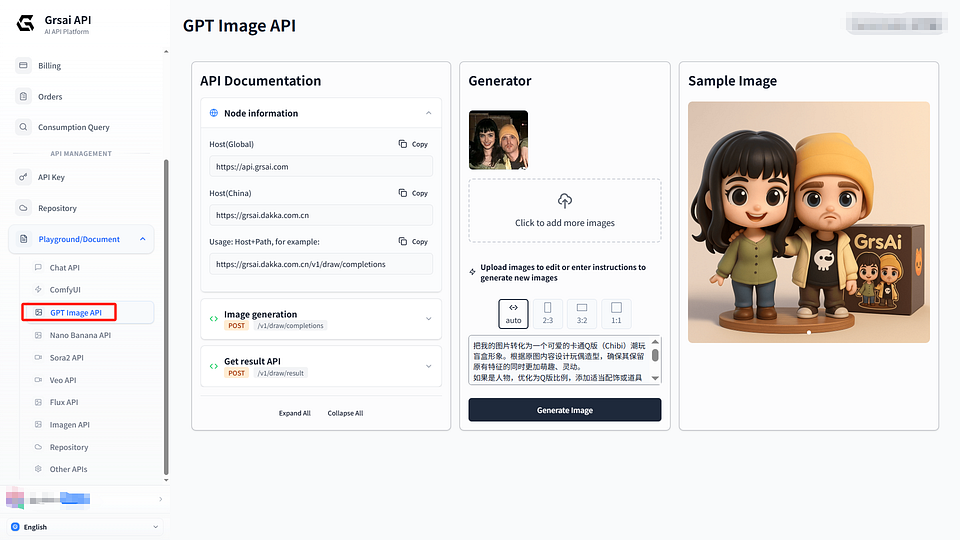
GrsAI API Key Acquisition Method
- Visit GrsAI console
- Create in the top right corner, copy and use it
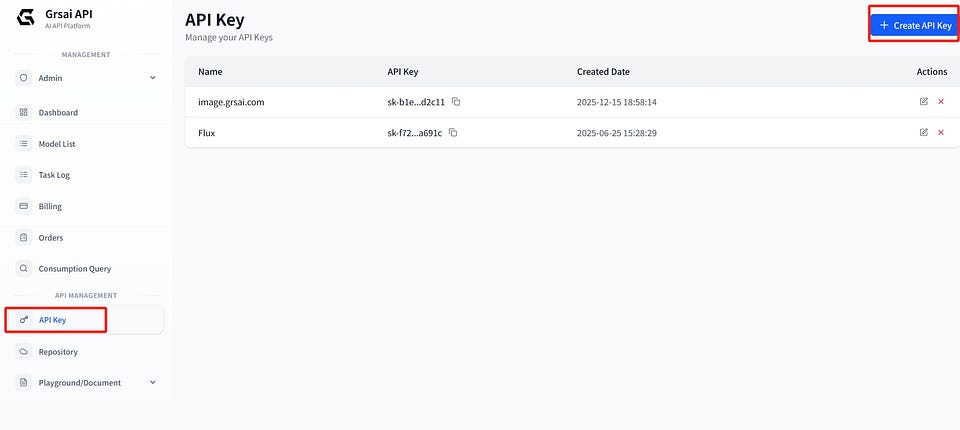
Development documentation: https://grsai.com/dashboard/documents/gpt-image
GrsAI Domestic Quick Access Code
Installation
pip install requestsExample 1: Streaming response (recommended, real-time progress acquisition)
import requests
import json
# Configuration information
API_KEY = "Your API key"  # Obtained from GRSAI platform
BASE_URL = "https://api.grsai.com"  # Overseas node
# BASE_URL = "https://api.grsai.cn"  # Domestic node
# Request headers
headers = {
    "Content-Type": "application/json",
    "Authorization": f"Bearer {API_KEY}"
}
def generate_image_simple(prompt):
    """
    Simplest image generation function
    prompt: Image description, such as "A cute cat playing on the grass"
    """
    # Request data
    data = {
        "model": "sora-image",  # Fixed value
        "prompt": prompt,       # Required: Image description
        "size": "1:1",          # Optional, ratio: auto、1:1、3:2、2:3
        "variants": 1           # Optional, batch generate 1-2 images (default 1, each extra +50 credits)
    }

    # Send request
    response = requests.post(
        f"{BASE_URL}/v1/draw/completions",
        headers=headers,
        json=data    )

    # Process streaming response
    for line in response.iter_lines():
        if line:
            line_str = line.decode('utf-8')
            if line_str.startswith('data: '):
                result = json.loads(line_str[6:])

                # Display progress
                if 'progress' in result:
                    print(f"Progress: {result['progress']}%")

                # Generation complete
                if result.get('progress') == 100:
                    if result.get('status') == 'succeeded':
                        print("✓ Generation successful!")
                        print(f"Image address: {result.get('url')}")
                        print(f"Image size: {result.get('width')}x{result.get('height')}")
                        return result                    else:
                        print("✗ Generation failed:", result.get('failure_reason'))
                        return None
# Usage example
if __name__ == "__main__":
    result = generate_image_simple("A cute cat playing on the grass")
    if result:
        print("Image generation complete!")
Example 2: Using WebHook asynchronous callback (suitable for production environment) Add “webHook”: “Your server address” in payload, server receives POST data to process results.
import requests
# Configuration
API_KEY = "Your key"
HOST = "https://api.grsai.com"

# Content to generate
prompt = "A cute cat playing on the grass"
# Request data - Key is to add this line!
payload = {
    "model": "sora-image",
    "prompt": prompt,
    "webHook": "http://Your server address/callback"  # ← Just add this line!
}
# Send request
response = requests.post(
    f"{HOST}/v1/draw/completions",
    json=payload,
    headers={
        "Content-Type": "application/json",
        "Authorization": f"Bearer {API_KEY}"
    }
)
print("Task submitted!")
Example 3: Immediate return ID + polling results
# First step: Submit task
payload["webHook"] = "-1"  # Special value, return ID
resp = requests.post(url, json=payload, headers=headers).json()
task_id = resp['data']['id']
print(f"Task ID: {task_id}")
# Second step: Poll results
result_url = f"{host}/v1/draw/result"
while True:
    result = requests.post(result_url, json={"id": task_id}, headers=headers).json()
    if result['code'] == 0:
        data = result['data']
        print(f"Status: {data['status']}")
        if data['status'] == "succeeded":
            for res in data['results']:
                print(f"Image: {res['url']}")
            break
    time.sleep(5)  # Check every 5 seconds
By accessing GPT Image 1.5 through GrsAI, you can quickly integrate more advanced image generation capabilities at lower costs and higher stability. Go try it out!


评论
发表评论