OpenAI Strikes Back Strongly! Does GPT-Image-1.5 Crush Nano Banana Pro Post-Launch? In-Depth Tests Reveal the Truth
In 2025, competition in the AI image generation field has reached a fever pitch, with the two giants OpenAI and Google leading the charge! You release yours, I release mine… So which one is the best to use? How to use it? How to access the API?
Less than a month after the release of Google’s Nano Banana Pro (Gemini 3 Pro Image model), OpenAI followed suit on December 16, 2025, with its latest image generation model GPT-Image-1.5. Both models offer better prompt following, precise editing, text rendering, and realism. This article will introduce the two models respectively, compare their effects, and provide a practical guide for API integration.

GPT-Image-1.5 Introduction
GPT-Image-1.5 is OpenAI’s flagship image generation model, integrated into the ChatGPT Images feature, free and open to all ChatGPT users, while also provided through the API for developers and enterprises.
Main features:
- Speed improvement: Generation speed is 4 times faster than the previous generation (DALL-E 3 / GPT-Image-1), about 1 minute
- Precise editing: Supports precise “add, delete, merge” editing
- Consistency: Maintains character appearance and lighting consistency during editing, and ensures consistency across multiple images.
- Better prompt following: More accurately understands complex instructions, supports multi-round editing
- Text rendering improvement: Better handles small and dense text, suitable for generating infographics etc. (Chinese effect is poor)
- Cost optimization: Image input/output costs in API reduced by 20%
- Other: Supports high-quality generation, preserves important details (such as brand logos), suitable for professional workflows
Official website: https://chatgpt.com/images
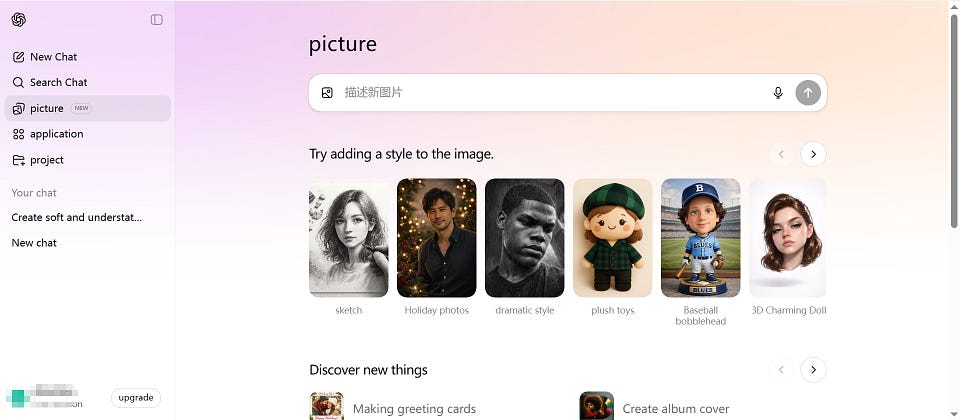
Nano Banana Pro Introduction
Nano Banana Pro is an image generation and editing model developed by Google DeepMind based on Gemini 3 Pro, mainly accessed through the Gemini app, Google AI Studio, and API (free users have limits, paid users have higher).
Main features:
- Studio-level control: Supports deep adjustments (such as depth of field, focal length, lighting, color grading), fine local editing
- Text rendering: Supports multiple languages, strong readability, suitable for posters, infographics, complex layouts
- Multi-image fusion: Can combine up to 14 reference images, maintaining character consistency
- Real-world knowledge: Integrates Google Search, supports generating factually accurate charts, maps, historical scenes
- High resolution: Supports 4K output, professional-level quality
- Editing capability: Natural language editing, maintains detail consistency, excels at multi-character interactions and complex compositions
Nano Banana Pro is more applied in cross-border e-commerce businesses, quickly outputting posters, product images, detail pages, replacing character clothing, unifying styles, and directly referencing competitor images. Nano Banana Pro basically delivers a crushing experience in these aspects, and independent station sellers have directly made it their main tool.
Official website: https://gemini.google.com/
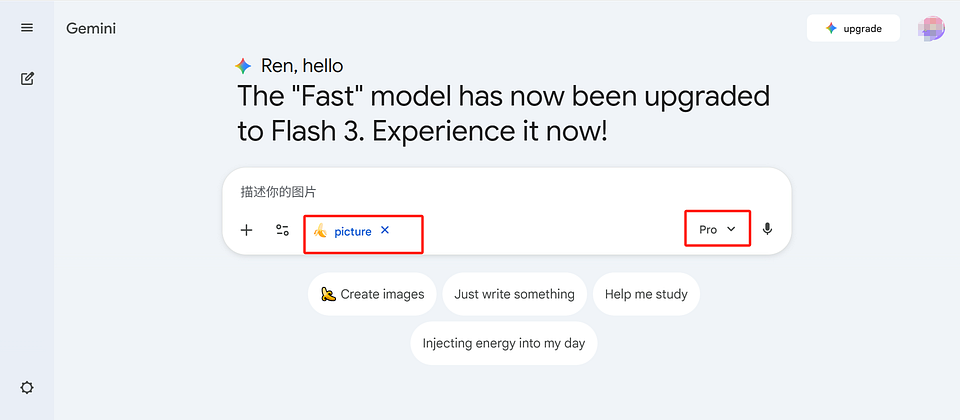
use these two models: https://styleai.art
GPT-Image-1.5 VS Nano Banana Pro Effect Comparison
- Prompt following and complex instructions: Both maintain stronger consistency in single-round/multi-round editing, can strictly execute “only modify specified parts”. Nano Banana Pro leads in multi-image fusion and world knowledge (such as factually accurate charts), smarter.
- Text rendering: Nano Banana Pro has strong Chinese readability, Chinese text is basically clear. GPT Image 1.5 has poorer Chinese readability. Both support outputting Markdown format, GPT Image 1.5 performs better in thick/thin font variations, higher reading and aesthetic realism, Nano Banana Pro has uniform font thickness, not natural enough.
- Photographic realism and style: GPT Image 1.5 prefers character close-ups, default zoom with depth of field (foreground real, background blurred), overall image slightly yellowish, rigidly replicates original expressions, poses, and states when providing reference images. Nano Banana Pro allows specifying depth of field zoom, focuses more on light expression and shadow combination, image clear and natural, 4K output clarity higher than GPT Image 1.5.
- Editing precision (add/modify/delete elements): Both have similar capabilities, GPT Image 1.5 is slightly more rigorous and rigid in “preserving details without mistaken changes”, outputs only front view if front is provided. Nano Banana Pro is stronger in flexible changes (such as automatically optimizing poses, shadow connections), provides more camera/lighting control options.
- Speed and API: Generation speeds are similar, official GPT Image 1.5 API lowest pixel $0.009 (0.06/image), highest $0.20 (1.42/image). Official Nano Banana Pro API generates one 1K or 2K $0.134 (0.96/image), 4K $0.24 (1.73/image). GrsAi API’s GPT Image 1.5 — — 0.02/image, Nano Banana Pro — — 0.09/image.
World knowledge understanding

- Solve equation: On a whiteboard, use C language to solve the equation log_{x²+1}(x⁴-1)=2. Please clearly write the solution steps.
Image realism

- “A middle-aged woman cooking in a busy professional kitchen, realistic light and shadow, steam and skin texture, high-definition photography style”

- “Los Angeles street skateboarding scene, 1990s documentary style, 35mm film, natural daylight, embedded film grain”
Text effects
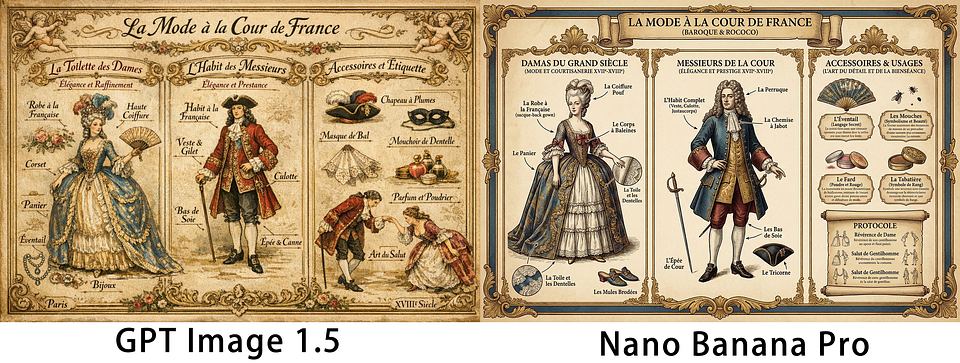
- Create a vintage infographic in European Baroque period (17–18th century) style, introducing French court noble fashion attire. Divided into three independent parts: ladies’ attire, men’s clothing, accessories and etiquette. Ensure all text is clear and readable, and conforms to the style of that era, Chinese

There is an English version newspaper on the table. The newspaper displays the following Markdown format content, do not display any Markdown symbols, present it in a natural newspaper article form. Please accurately preserve all content, format, and numbers. The image should be high proportion scaling.# GPT Image 1.5 vs Nano Banana Pro: 2025 Ultra-Strong Image Generation Models In-Depth Showdown### *Realism, Text Rendering, Consistency and Editing Ability Comprehensive Comparison*December 22, 2025
---
At the end of 2025, the two flagship models in the image generation AI field——OpenAI's **GPT Image 1.5** and Google's **Nano Banana Pro**——have officially become the focus of developers and designers. The former excels in prompt following, dense text rendering, and precise iterative editing, while the latter outperforms in character consistency, complex scene fusion, and natural realistic details. Both represent the highest level of current image AI, suitable for UI design, poster marketing, product visualization, character creation, and various professional scenarios.
---## Key Comparison Dimensions| Comparison Dimension       | GPT Image 1.5 Advantages                                   | Nano Banana Pro Advantages                               |
|----------------|-----------------------------------------------------|---------------------------------------------------|
| Image Realism     | Excellent light and shadow, material details, and color restoration                      | Skin texture, crowd diversity, and natural lighting more realistic               |
| Text Effects       | Dense small text posters, UI label rendering sharp and clear, layout precise          | Multi-language text naturally integrated into complex scenes, smoother reading experience         |
| Consistency         | Retains key details like faces, Logos during iterative editing, stable style        | Minimal drift in multi-image same character faces, features, clothing             |
| Editing Modification       | Precise local modifications without affecting overall, suitable for professional iterative workflows          | Studio-level targeted adjustments, more natural light and shadow connections                 |
| Adding Elements       | Naturally incorporates new objects through complex prompts, strong compatibility                | Relies on world knowledge, added elements blend more harmoniously and realistically         |
| Complex Scene Understanding   | High prompt following, rich details                            | More reasonable crowd interactions, environmental physics logic                       |
---
Feedback from multiple developer communities and design platforms:
- **GPT Image 1.5** is more suitable for marketing posters needing large amounts of text, product packaging, UI prototypes, and rapid iterative design tasks.
- **Nano Banana Pro** stands out in character concept design, storyboard shots, realistic crowd scenes, and film preview images, especially suitable for creative projects needing high consistency and natural feel.
Notion, Figma plugin developers, and independent designers generally believe that GPT Image 1.5 leads in toolchain integration and batch generation efficiency; while for pursuing "glance-real" photography-level output, Nano Banana Pro is more popular.
---
**Conclusion**
GPT Image 1.5 and Nano Banana Pro each have their strengths, no absolute winner. Actual performance highly depends on specific use scenarios. It is recommended that developers use completely identical prompts for side-by-side testing (such as movie posters, multi-image character consistency, complex infographic fusion, etc.), to choose the model most suitable for their project.
Currently both are open through official APIs and third-party platforms (such as GrsAI), cost and stability differences are also worth attention.

- iOS app “Home Cooking AI” product screenshot trio, minimalist modern interface style, pure white background, three screens horizontally arranged like real phone screenshots: First screen: Ingredient entry page, title ‘My Fridge’, top search bar, below grid displaying added ingredient cards (such as tomatoes, eggs, beef, green onions ginger garlic, rice), each card with small icon and remaining amount prompt, bottom large button ‘+ Add Ingredient’, text clear and sharp; Second screen: Smart menu generation page, title ‘Today’s Recommended Recipes’, displays 3–4 recipe cards generated by AI based on inventory (such as Kung Pao Chicken, Tomato Scrambled Eggs, Tomato Beef Brisket Soup), each card includes finished product image, required ingredients (available ones with green check, missing marked red), time and difficulty, top prompt ‘Utilize inventory ingredients, reduce waste’, below ‘One-click generate new menu’ button; Third screen: Recipe details and cooking guidance page, displays detailed steps for one dish (such as Tomato Scrambled Eggs), large finished product photo, below step-by-step text descriptions + small images, right side lists required seasonings (soy sauce, salt, sugar etc. can check inventory), bottom ‘Start Cooking’ and ‘Shopping List’ buttons, all text fonts consistent, all content language is English.
Character consistency
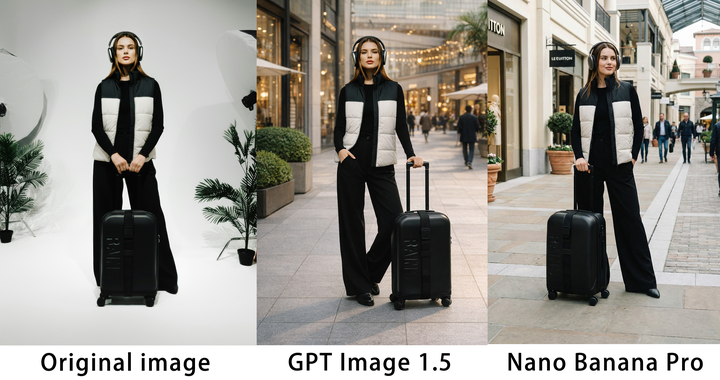
- Based on this photo, without changing character facial details, hand items, change background to outdoor mall and change to a different pose
Multi-image fusion

- Sunny outdoor grass picnic scene, high-definition realistic professional photography style, warm natural light and shadow, soft atmosphere. Red and white checkered picnic cloth laid on grass as center, surrounding elements naturally and harmoniously placed, balanced composition, coordinated proportions, rich details: Tricolor cat curiously sitting on picnic cloth edge, wet wipes pack casually placed in cloth center, exquisite afternoon tea set (three-tier cake stand, teapot teacups, sliced cakes) neatly placed, folding wooden picnic table and four chairs slightly behind, Suzuki tent half-set in background grass, several bottles of red and white wine, orange juice and wine glasses arranged on cloth, hamburgers on plates as main food, picnic basket open filled with fresh flowers, Border Collie happily tongue out sitting on other side of picnic cloth. All elements unified light and shadow, naturally integrated into scene, echoing each other, not abrupt or piled up, real outdoor picnic atmosphere, professional e-commerce level photography quality.


- A medium shot of the 14 fluffy characters sitting squeezed together side-by-side on a worn beige fabric sofa and on the floor. They are all facing forwards, watching a vintage, wooden-boxed television set placed on a low wooden table in front of the sofa. The room is dimly lit, with warm light from a window on the left and the glow from the TV illuminating the creatures’ faces and fluffy textures. The background is a cozy, slightly cluttered living room with a braided rug, a bookshelf with old books, and rustic kitchen elements in the background. The overall atmosphere is warm, cozy, and amused
Adding elements

- Completely fuse the model from the second image into the first picnic scene: Model naturally sitting on one of the folding wooden chairs, her suitcase placed beside, keep model facial details all elements unchanged; Picnic scene keeps original layout and details, light and shadow naturally unified, perspective correct, model perfectly integrated into environment without abruptness, high-definition realistic professional photography style, sunny outdoor atmosphere

Modifying elements
Reference image prompt modification
- Based on this photo, without changing character facial details, change the suitcase to the style of image two

Screen annotation modification
- Modify corresponding content according to screen requirements, naturally integrate into screen
Overall, for outputs requiring Chinese, prioritize Nano Banana Pro, stronger in creative control, world knowledge, image editing, multi-reference fusion. GPT-Image-1.5 is more suitable for rapid iteration and precise editing, choice depends on needs.
API Interface Integration Practical
GrsAI (https://grsai.com)is a domestic source AI large model API aggregation platform, providing official source access API channels, domestic and overseas dual nodes free choice, high concurrency no speed limit, automatic refund on failure. Most importantly, cheap and stable combined:
- GPT-Image-1.5 — — 0.02/image
- Nano Banana Pro — — 0.09/image (1–4K high-definition)
- Nano Banana — — 0.022/image
- Veo3.1/Veo3.0 — — 0.4/video
- Sora2 — — 0.08/video
- Gemini3….
All models far below official API, suitable for batch generation, e-commerce new products, marketing materials etc. scenarios.
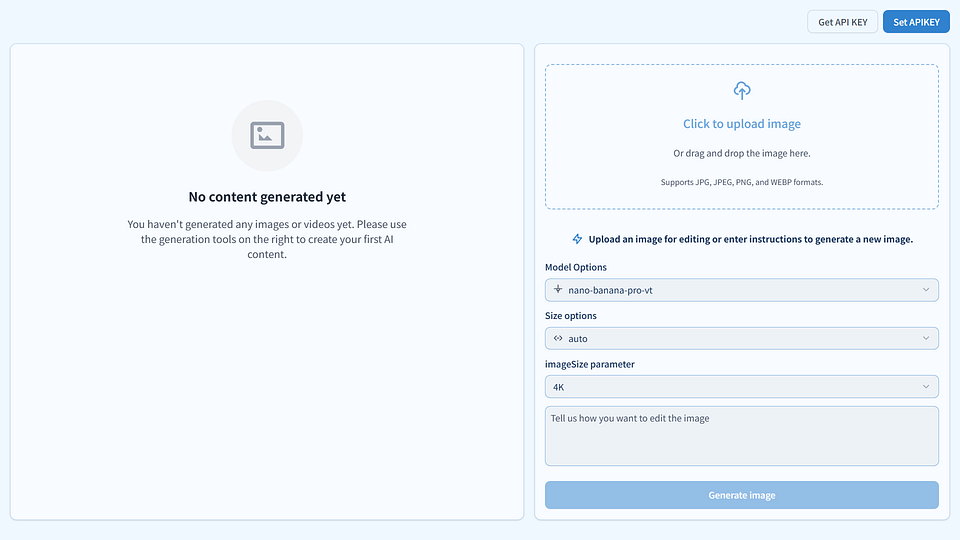
Ordinary users can use free batch generation tool: image.grsai.com
- Visit official website Grsai ( https://grsai.com)
- Enter console → API Keys → One-click create Key (copy and save)
- View development documents: https://grsai.com/dashboard/documents/gpt-image
Gpt-image-1.5 API Integration Tutorial
Interface: POST /v1/draw/completions
Model name: gpt-image-1.5
import requests
import json
API_KEY = "Your GrsAI Key"
BASE_URL = "https://api.grsai.com"  # Overseas node (recommended)
# BASE_URL = "https://api.grsai.cn"  # Domestic node
headers = {
    "Authorization": f"Bearer {API_KEY}",  # Obtained from Grsai.com console
    "Content-Type": "application/json"}
payload = {
    "model": "gpt-image-1.5",
    "prompt": "A cute cat playing on the grass, high-definition realistic style",
    "size": "1:1",      # Ratio, optional auto, 1:1, 3:2 etc.
    "variants": 1       # Batch generate images, can fill: 1, 2 (add one image deduct 50 points)
}
response = requests.post(f"{BASE_URL}/v1/draw/completions", headers=headers, json=payload)
# Stream print progress and results (recommended)
for line in response.iter_lines():
    if line:
        data = json.loads(line.decode('utf-8').lstrip('data: '))
        if 'progress' in data:
            print(f"Progress: {data['progress']}%")
        if data.get('progress') == 100 and data.get('status') == 'succeeded':
            print("Image URL:", data['url'])
Nano Banana Pro API Integration Tutorial
Interface: POST /v1/draw/nano-banana
Model name: nano-banana-pro (highest quality version)
import requests
import json
API_KEY = "Your GrsAI Key"
BASE_URL = "https://api.grsai.com"  # Overseas node (Pro recommended)
headers = {
    "Authorization": f"Bearer {API_KEY}",
    "Content-Type": "application/json"}
payload = {
    "model": "nano-banana-pro",          # Or nano-banana-fast (faster)
    "prompt": "A fashionable girl at outdoor picnic, natural light and shadow, ultra-clear realistic",
    "aspectRatio": "1:1",                # Ratio, optional auto, 16:9 etc.
    "imageSize": "4K"                    # Pro supports 1K/2K/4K
}
response = requests.post(f"{BASE_URL}/v1/draw/nano-banana", headers=headers, json=payload)
# Stream print progress and results
for line in response.iter_lines():
    if line:
        data = json.loads(line.decode('utf-8').lstrip('data: '))
        if 'progress' in data:
            print(f"Progress: {data['progress']}%")
        if data.get('progress') == 100 and data.get('status') == 'succeeded':
            for res in data.get('results', []):
                print("Image URL:", res['url'])
- Both support streaming responses.
- For asynchronous, can add “webHook”: “Your callback URL” or “webHook”: “-1” to immediately return id then poll /v1/draw/result.
- Automatic refund on failure, high stability.


评论
发表评论