Super Low-Price Sora 2 API Practical Guide ($0.08 per video): Unlocking All Cameo Multi-Character + Remix Video Remixing Functionality
Sora 2 API Integration Tutorial (Just $0.08 per Video): Full Support for Cameo Multi-Character Upload + Remix Features
Sora 2’s “Cameo” Feature: A Complete Guide to the Official Real-Person Appearance Function
Cameo is the official real-person appearance feature launched with Sora 2. It allows users to record a short verification video, from which the system extracts your facial features, body type, and voice characteristics. These are then seamlessly blended into any AI-generated scene, enabling “real actor + virtual environment + voice acting” hybrid video creation.
This article provides a detailed guide on how to use the Sora 2 Cameo feature, as well as how enterprises, independent developers, and regular users can access Sora 2 Cameo through the GrsAi API.
How to Record a Video for the Sora 2 Cameo Feature
Record a short personal video as instructed, reading aloud the numbers displayed on the screen. The system will learn your appearance, movements, and even your voice from this clip.
You can then set usage permissions for your Cameo, such as:
- Private (only you can use it)
- Open to all friends
- Require your approval before others can use it
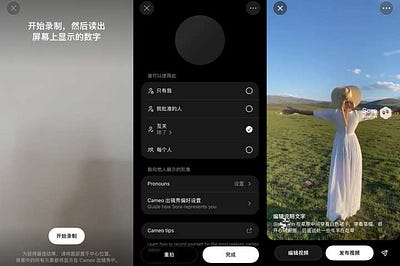
How to Use Cameo Characters
Using the “Sora” app as an example:
- Tap the “+” button at the bottom to create a video.
- Select a character from the Cameo appearance gallery.
- Use the “@” tag to call up a character you’ve already created or one shared by others (your own will appear first).
- Enter your prompt (supports Chinese input) and wait for generation.

Prompt Formula
[Scene description] + [Main character (me/Cameo character) actions] + [Environmental details] + [Style requirements]
Example: An ancient giant dragon coiled atop a mountain peak, I am an elven mage raising my staff to summon a magical shield, blocking the fiery breath, with shattered boulders, magical dust, clouds and sunset, epic fantasy, cinematic wide-angle, dramatic lighting.
Tips:
- Use “I” or “main character” to refer to the Cameo role.
- Describe actions and scenes in detail.
- Avoid describing facial details (the AI will automatically match your features).
- You can specify clothing, scenes, or atmosphere.
Application Scenarios
- Personal entertainment: Insert yourself or friends into historical blockbusters or sci-fi scenes.
- treści creation: Virtual influencer operations, brand marketing content production.
- IP economy: Digital portrait rights licensing, offering new monetization channels for celebrities and classic IPs.
- Advertising and marketing: Large-scale generation of personalized ad content.
Sora 2 Cameo API Integration Guide (Practical Tutorial)
Sora 2 currently has strict regional restrictions and operates on an invite-only basis. Users without an invite code and outside the US/Canada (or using non-US/Canada IPs) cannot access it directly. OpenAI has not yet opened an official Sora 2 API, including support for Cameo and Remix features. So how can enterprises or independent developers access a genuine Sora 2 API?
GrsAi API
GrsAi API(https://grsai.com) is a source-level AI large model API provider offering affordable and stable access with direct domestic connections in China. Sora 2 costs just 0.08 per video and fully supports calling Sora 2 Cameo (Upload multiple characters) and Remix features.
For Sora 2 API integration documentation, please view it in the console: https://grsai.com/zh/dashboard/documents/sora-2
Current models available on the platform include: Nano Banana — 0.022/image, Sora-image (GPT-4o) — 0.02/image, Veo3.1/Veo3.0–0.4/image, Gemini, Flux, and more. Check the full model list(https://grsai.com/zh/dashboard/models) in the console.
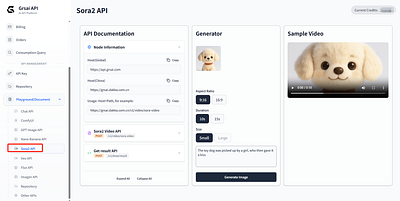
Cameo Integration
🔑 Basic Environment Setup
API Endpoint Information
// For overseas users
const HOST_OVERSEAS = "https://api.grsai.com";
// For domestic (China) users
const HOST_DOMESTIC = "https://grsai.dakka.com.cn";
// Endpoint URL
const API_ENDPOINT = `${HOST_DOMESTIC}/v1/video/sora-video`;Request Headers
const headers = {
  "Content-Type": "application/json",
  "Authorization": "Bearer your_api_key_here" // Replace with your actual API key
};
🎭 Multi-Character Upload Feature Explained
The characters parameter in detail:
{
  "characters": [
    {
      "url": "https://example.com/characterA.mp4",
      "timestamps": "0,3"
    },
    {
      "url": "https://example.com/characterB.mp4",
      "timestamps": "1,4"
    }
  ]
}
Parameter Rules:
- url: Publicly accessible URL of the character video (MP4 format supported).
- timestamps: Clip range in the video, format “start_second,end_second”.
- Duration limit: Each character video can be clipped to a maximum of 3 seconds.
- Prohibited content: Uploading real-person video content is strictly forbidden.
Character Reference Syntax
In the prompt, use @character + index number to reference characters:
Correct examples:
// Correct Example
const prompt = "In a park on a bench, @character1 is reading a book while @character2 plays nearby";

//Indexing starts at 1, corresponding to the order in the characters array.
//@character1 → characters[0]
//@character2 → characters[1]
If you want to use a Cameo role exposed in Sora2, you can use it directly in the prompt word @ user ID.

💡 Complete Practical Example
Scenario: Create two cartoon characters in a park setting
Step 1: Prepare character videos
- Character A: A dancing cartoon bunny (3-second video)
- Character B: A flying cartoon bird (3-second video)
- Ensure video files are publicly accessible via URL
Step 2: Build the API request
const requestBody = {
  "model": "sora-2",
  "prompt": "On a sunny park day, @character1 is happily dancing on the grass, @character2 is soaring through the sky, with flowers and trees in the background, cartoon animation style",
  "url": "https://example.com/park_background.png", // Optional scene reference image
  "aspectRatio": "16:9",
  "duration": 10,
  "size": "large",
  "characters": [
    {
      "url": "https://example.com/rabbit_dance.mp4",
      "timestamps": "0,3"
    },
    {
      "url": "https://example.com/bird_fly.mp4",
      "timestamps": "0,3"
    }
  ],
  "webHook": "https://your-app.com/callback", // Callback URL
  "shutProgress": false
};
Step 3: Make the API call
// Using Fetch API
async function generateSoraVideo() {
  try {
    const response = await fetch('https://grsai.dakka.com.cn/v1/video/sora-video', {
      method: 'POST',
      headers: headers,
      body: JSON.stringify(requestBody)
    });

    const data = await response.json();
    console.log('Task ID:', data.data.id);
    return data;
  } catch (error) {
    console.error('API call failed:', error);
  }
}
🔄 How to Retrieve Results
Method 1: WebHook Callback (Recommended)
const callbackData = {
  "id": "f44bcf50-f2d0-4c26-a467-26f2014a771b",
  "results": [
    {
      "url": "https://example.com/generated_video.mp4",
      "removeWatermark": true,
      "pid": "s_6916910fc8548191aa07e106e84b3bb8"
    }
  ],
  "progress": 100,
  "status": "succeeded",
  "failure_reason": "",
  "error": ""
};
Method 2: Polling
// Query endpoint
async function getResult(taskId) {
  const response = await fetch('https://grsai.dakka.com.cn/v1/draw/result', {
    method: 'POST',
    headers: headers,
    body: JSON.stringify({ id: taskId })
  });

  return await response.json();
}
// Polling example
async function pollResult(taskId, interval = 5000) {
while (true) {
const result = await getResult(taskId);
if (result.data.status === 'succeeded') {
console.log('Generation successful:', result.data.results[0].url);
break;
} else if (result.data.status === 'failed') {
console.error('Generation failed:', result.data.failure_reason);
break;
}
console.log(`Progress: ${result.data.progress}%`);
await new Promise(resolve => setTimeout(resolve, interval));
}
}⚠️ Important Notes
1.Video Specifications
- Character videos: Max 3-second clip
- MP4 format only; URL must be publicly accessible
- Prohibited: Uploading real-person video content
2.Billing & Quotas
- Failed generations refund credits
- Video URLs expire after 2 hours
- Download results promptly
3.Error Handling
const errorMessages = {
  "output_moderation": "Output content violation",
  "input_moderation": "Input content violation",
  "error": "Other system error"
};
🚀 Advanced Tips
- Remix/Continuation: Use the remixTargetId parameter to create sequels from existing videos:
{
  "remixTargetId": "s_6916910fc8548191aa07e106e84b3bb8",
  "prompt": "The same characters in a nighttime park, @character1 and @character2 continuing their adventure under moonlight"
}- Multi-Size Strategy:
// Quick preview with small size
const previewRequest = {
  size: "small",
  duration: 10
};
// Final output with large size
const finalRequest = {
size: "large",
duration: 15
};With the GrsAi Sora 2 API, developers can fully leverage multi-character upload to create rich, personalized AI video content, adding powerful video generation capabilities to their applications.
Tip: Before using, make sure you have a valid API key and carefully review the latest API documentation for any updates or changes.


评论
发表评论