The official Nano Banana Pro API is only $0.09 per image: Complete integration tutorial + free usage methods + 9 high-efficiency tips
Nano Banana Pro, on top of the practical functions that everyone is familiar with, has achieved a comprehensive intelligent upgrade.
The new version has significantly improved its understanding and generation capabilities across multiple languages worldwide and the newly added “world knowledge” search capability allows the AI to have broader knowledge when creating, making the works more precise and deeper. Whether you need a unified brand IP image/logo, or directly output exquisite 4K materials, or material images suitable for different media channels, it can handle them all.
Nano Banana Pro has been released for some time, and global users are frantically exploring it. This article organizes the official provided gameplay prompt words and cheap stable API calls (Nano Banana Pro — — 0.09/piece 1–4k same price) strategies. How to use prompt words and API to apply the powerful new functions of Nano Banana Pro in areas such as text rendering, character consistency, and world knowledge to your work.
Whether you want to improve efficiency or pursue higher quality content output, this strategy can definitely help you.

一、Prompt Word Golden Formula
Nano Banana Pro is a model that “thinks”. It doesn’t just do keyword matching, but truly understands intentions, physical laws, and picture composition. To get the best results, don’t use “keyword tags” (for example: park, flowers, beauty, 4k, incredible), just say what you want directly.
1.Edit, don’t regenerate
The model is very good at understanding conversational modifications. If the picture is already 80% correct, don’t start generating a new one from scratch. Just propose the specific modifications you need.
Example: “This one is great, but please change the lighting to a sunset feel, and change the text to neon blue.”
2.Use natural language and complete sentences
When communicating with the model, guide it like directing an artist to create. Use correct grammar and descriptive adjectives.
❌Bad: “Cool car, neon lights, city, night, 8k.”
✅Good: “A highly cinematic wide-angle lens showing a futuristic sports car speeding on the streets of Tokyo on a rainy night. The glow of neon lights reflects on the wet pavement and the metal chassis of the car.”
3.Be specific and describe clearly
Vague prompts will only get cookie-cutter results. Clearly specify the theme, scene, lighting, and atmosphere.
Theme: Don’t use “a lady”, but use “an elegant old woman wearing a vintage Chanel-style suit”.
Material: Describe the texture. “Matte surface”, “brushed steel”, “soft velvet”, “wrinkled paper”.
4.Provide background information (“why” or “for whom”)
Because the model “thinks”, providing it with background information helps it make logical artistic decisions.
For example: “Create a picture of a sandwich for a Brazilian high-end gourmet recipe book.” (The model will infer professional plating, shallow depth of field, and perfect lighting).

二、Nano Banana Pro Core Gameplay
1.Text Rendering, Infographics, and Visual Synthesis
Nano-Banana Pro has advanced functions that can render clear, readable, stylized text, and synthesize complex information into visual formats.
Best Practices:
Compression: Ask the model to “compress” dense text or PDFs into visual aids.
Style: Specify if you want “exquisite editorial style”, “technical chart style”, or “hand-drawn whiteboard style”.
Quotes: Clearly specify the text you want in quotes.
Example Prompt:
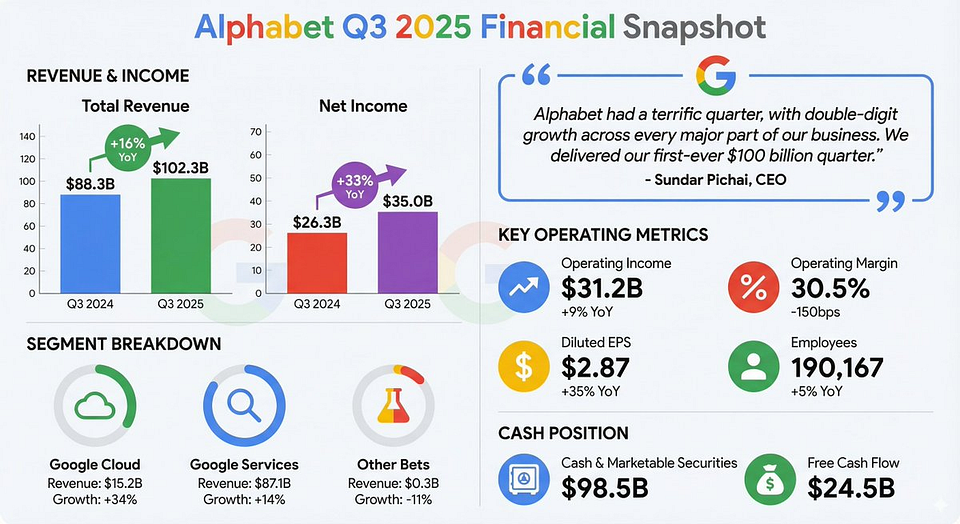
Revenue Report Infographic (Data Import): Text or images, through Gemini you can use PDF files ] “Create a concise modern infographic summarizing the key financial highlights of this earnings report. The chart should include ‘revenue growth’ and ‘net profit’, and highlight the CEO’s key quote in a stylized introduction box.”
Retro Infographic: “Create a retro infographic in the style of 1980s China, introducing the history of Beijing restaurants. The infographic should include separate sections for ‘food’, ‘attractions’, and ‘folk items’. Ensure all text is clear and readable, and matches the style of that era.”

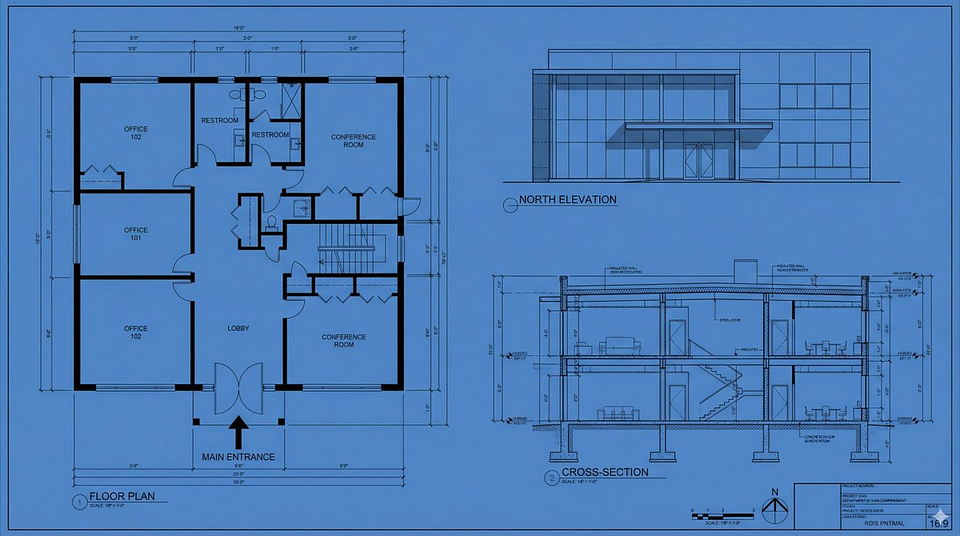
Technical Blueprint: “Draw an orthographic blueprint describing the building in plan view, elevation view, and section view. Use professional architectural fonts to clearly label ‘north elevation’ and ‘main entrance’. Format is 16:9.”
Whiteboard Summary (Teaching Use): Summarize the concept of “Transformer neural network architecture” in the form of a hand-drawn whiteboard diagram, suitable for university lectures. Use different colored markers for the encoder and decoder modules, and clearly label “self-attention” and “feed-forward”.

2.Character Consistency and Viral Thumbnails
Nano-Banana Pro supports up to 14 reference images (of which 6 are high-fidelity images). This makes the “identity lock” function possible — placing specific characters or roles in new scenes without facial distortion.
Best Practices:
Identity Lock: Clearly state: “Keep the character’s facial features exactly the same as in image 1.”
Expressions/Actions: Describe changes in emotion or posture while maintaining identity.
Viral Composition: Combine the theme with eye-catching graphics and text all at once.
Example Prompt: “Viral Thumbnail” (Logo + Text + Graphics): Use the character from figure 1 to design a viral video thumbnail. Facial Consistency: Keep the character’s facial features exactly the same as in figure 1, but change their expression to look excited and surprised. Action: Place the character on the left side of the screen, with fingers pointing to the right side of the screen. Subject: Place a high-definition picture of delicious avocado toast on the right. Graphics: Add a striking yellow arrow connecting the character’s fingers and the toast. Text: Overlay eye-catching pop-style text in the middle: “3minuteFudede!” (Done in 3 minutes!). Use thick white lines and shadows. Background: Blurred bright kitchen background. High saturation and high contrast.
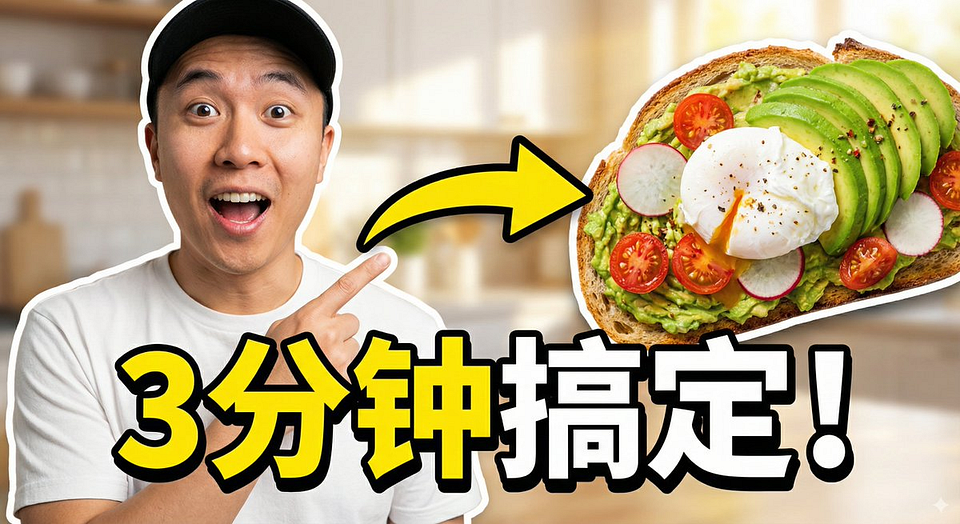
(Note: Need to upload reference pictures)
“Furry Friends” Scenario (Group Consistency): [Input 3 pictures of different plush toys] Please create a fun ten-page story about these three furry little buddies going on a tropical vacation. The story plot should be ups and downs, gripping, and end with a warm conclusion. The clothing and appearance of the three characters must remain consistent, but their expressions and angles should vary in the ten images. Each character can only appear once in each image.

Brand Asset Creation: [Input a product picture] “Please create 9 exquisite fashion blockbuster images, the style should be like award-winning fashion magazine blockbusters. Use this as a brand style reference, but make subtle adjustments and enrich variations in style to show a professional design sense. Create one at a time, for a total of nine images.”

3.Utilize Google Search for Basic Learning
Nano-Banana Pro uses Google search to generate images based on real-time data, current events, or factual evidence, thereby reducing hallucinations on current topics.
Best Practices:
Request visualizations of dynamic data (weather, stocks, news).
The model will “think” (reason) about the search results before generating the image.
Example Prompt:
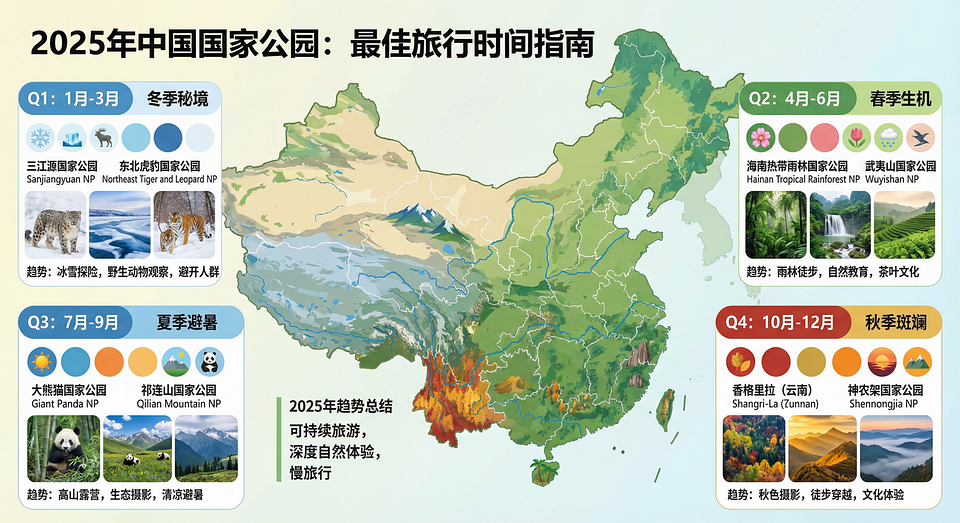
Event Visualization: “Based on current travel trends, generate an infographic showing the best times to visit U.S. national parks in 2025.”
4.Advanced Editing, Repair, and Coloring
The model is good at complex editing through conversational prompts. This includes “image repair” (remove/add objects), “restoration” (repair old photos), “coloring” (comics/black-and-white photos), and “style swap”.
Best Practices:
Semantic Instructions: No need for manual masking; just tell the model what to change naturally.
Physical Understanding: You can request complex changes, such as “fill this cup with liquid”, to test physical generation.
Example Prompt:
Object Removal and Completion: “Remove the tourists from the background of this photo, and fill the space with reasonable textures (cobblestones and storefronts) that match the surrounding environment.”

Comic/Manga Coloring: [Input black-and-white comic frame] “Color this comic. Use a vibrant anime-style color scheme. Ensure the energy beam’s lighting effect is neon blue, and the character’s clothing colors match their official colors.”

Localization (Text Translation + Cultural Adaptation): [Insert a picture of a London bus stop advertisement] “Localize this concept to a Tokyo background, including translating the slogan into Japanese. Change the background to the bustling Shibuya streets at night.”

Lighting/Season Control: [Input a picture of a summer house] “Turn this scene into winter. Keep the house’s architectural style unchanged, but add snow on the roof and yard, and change the lighting to a cold, overcast afternoon.”

5.Dimension Conversion (2D ↔ 3D)
A powerful new feature is converting two-dimensional diagrams to three-dimensional visualization images, and vice versa. This is ideal for interior designers, architects, and meme creators.
Example Prompt:
2D Floor Plan to 3D Interior Design Rendering: Based on the uploaded 2D floor plan, generate a professional interior design rendering. Layout: Use a collage form, with a main image at the top (wide-angle view of the living room), and three small images below (master bedroom, home office, and 3D top view). Style: All images in modern minimalist style, with warm oak floors and beige walls. Quality: Photo-level rendering, soft natural light.

2D to 3D Meme Conversion: “Convert the ‘This is Fine’ dog meme into a realistic 3D rendering. Keep the composition unchanged, but make the dog look like a plush toy, and the flames look like real flames.”

6.High Resolution and Texture
Nano-Banana Pro supports native 1K to 4K image generation. This is especially useful for handling fine textures or creating large-format prints.
Best Practices:
If your API/interface allows, explicitly request high resolution (2K or 4K).
Describe high-fidelity details (imperfections, surface textures).
Example Prompt:
4K Texture Generation: “Utilize native high-fidelity output to create a breathtaking, atmospheric moss forest ground environment. Control complex lighting effects and delicate textures, ensuring every strand of moss and every ray of light is rendered at pixel-level resolution to meet 4K wallpaper needs.”

Complex Logic (Thinking Mode): “Create a hyper-realistic premium cheeseburger infographic, disassemble it, showing the texture of toasted brioche bun, the seared crust of the patty, and the glistening melted cheese. Label each layer with its flavor characteristics.”

Thinking and Reasoning Nano-Banana Pro defaults to “thinking” mode, which generates some intermediate thinking images (not charged), to optimize the composition before rendering the final output. This helps with data analysis and solving visual problems. Example Prompt: Solve Equation: On a whiteboard, use C language to solve the equation log_{x²+1}(x⁴-1)=2. Clearly write out the solving steps.

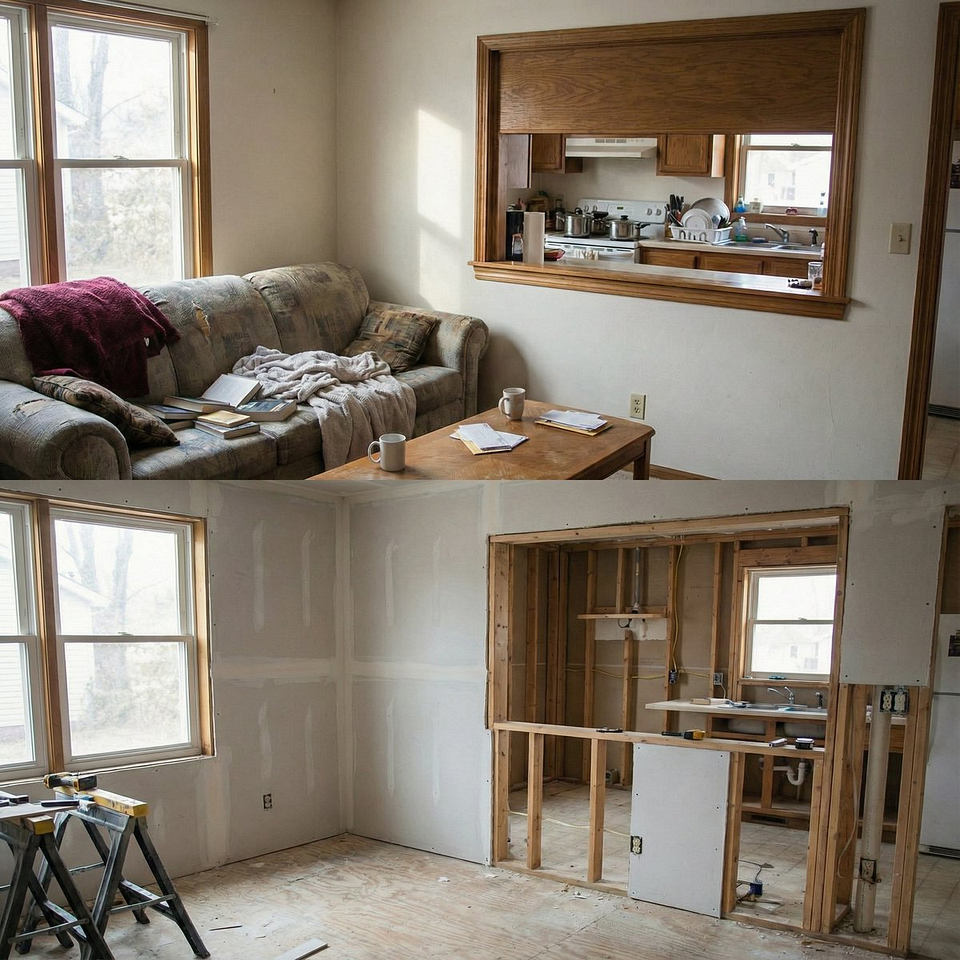
Visual Reasoning: “Analyze this room picture, generate a ‘before’ picture showing what the room might have looked like during construction, including framing and unfinished drywall.”
8.One-Time Storyboard and Concept Art
You don’t need a grid to generate continuous art images or storyboards, ensuring a coherent narrative flow in one operation. This method is also commonly used for “movie concept art” (for example, fake leaked images of upcoming movies).
Example Prompt:
Please create an engaging nine-part story, containing nine images, the story must feature a female and a male who are shooting an award-winning luxury luggage advertisement. The story should have emotional ups and downs, ending with an elegant photo of the female holding the brand logo. The identities and attire of the male and female protagonists must remain consistent, but they can be shot from different angles and distances. Please generate the images one by one. Ensure each image is in 16:9 horizontal format.

9.Structure Control and Layout Guidance
Input images are not limited to character references or objects to be edited. You can use them to strictly control the composition and layout of the final output. For designers who need to transform sketches, wireframes, or specific grid layouts into exquisite materials, this is undoubtedly a disruptive innovation.
Best Practices:
Sketches and Drafts: Upload hand-drawn sketches to accurately define the positions of text and objects.
Wireframes: Use screenshots of existing layouts or wireframes to generate high-fidelity UI models.
Grids: Use grid images to force the model to generate tile-based game or LED display resources.
Example Prompt:
From Sketch to Final Ad: “Create an ad for [product] based on this sketch.”

Create UI Model Based on Wireframe: “Create a model for [product] according to the following guidelines.”

Pixel Art and LED Display: “Please draw a unicorn pixel art that perfectly fits this 64x64 grid image. Use high-contrast colors.”
Sprite: A sprite sheet of a female doing a backflip on a drone, 3x3 grid, frame-by-frame animation sequence, square aspect ratio. Please draw exactly according to the structure of the attached reference image.” (Tip: You can extract each cell and make it into a GIF animation)

三、How to Use Nano Banana Pro
Official Free Trial (Google AI Studio & Gemini App): Currently, ordinary users can experience Nano Banana Pro for free through Google AI Studio(https://aistudio.google.com/) or in the “Create Image” function of the Gemini app. However, free users have call limit restrictions, and exceeding them will fall back to the regular version model. Paid Google AI Plus/Pro/Ultra users enjoy higher usage quotas.

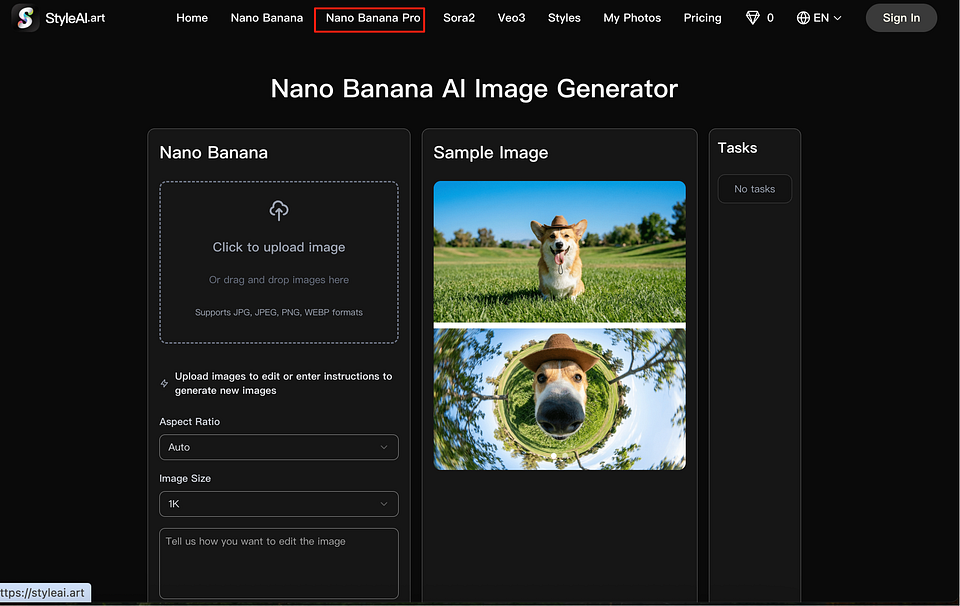
Use StyleAI(https://styleai.art/nano-banana-pro): An AI image video creative tool that integrates models such as Nano Banana Pro, Nano Banana, GPT-4o, Veo3, Sora2, etc., by selecting the corresponding model to call the core capabilities of Nano Banana Pro.
四、Nano Banana Pro API Call Method
For developers who want to integrate Nano Banana Pro’s image generation capabilities into applications, there are mainly the following two API call methods:
Official API Call:
You need to use Google’s official Gemini API. When calling, specify the model name as gemini-2.5-flash-image-preview (standard version) or gemini-3-pro-image (Pro version). For specific methods, refer to Gemini API documentation (https://ai.google.dev/gemini-api/docs)and Developer Guide(https://dev.to/googleai/introducing-nano-banana-pro-complete-developer-tutorial-5fc8).
Official Pricing Standards
Generating a 1K or 2K image costs $0.134 ($0.96), and generating a 4K image costs $0.24 ($1.73).
Google API Call Practice
This solution uses Google’s native Python SDK, suitable for developers pursuing stability and complete functionality.
Step 1: Obtain Key and Install
- Visit Google AI Studio (aistudio.google.com/), find the “Get API key” option in the left menu, and create a key.
- Install the SDK in the Python environment:
pip install google-generativeaiStep 2: Write and Run Python Code Replace YOUR_API_KEY in the following code with your actual key to run it.
import google.generativeai as genai
import json
import base64

# 1. Configure API key
genai.configure(api_key="YOUR_API_KEY")
# 2. Initialize Nano Banana Pro model
model = genai.GenerativeModel("gemini-3-pro-image-preview")  # This is the official model name[citation:2]
# 3. Call the model to generate image
try:
    response = model.generate_content(
        "A cute kitten sunbathing on the grass, bright style, rich details, high quality",  # Your prompt
        generation_config={
            "response_mime_type": "application/json",  # Require JSON format return
        }
    )
    # 4. Parse the returned JSON and save the image
    data = json.loads(response.text)
    image_data = data["candidates"][0]["content"]["parts"][0]["inline_data"]["data"]

    with open("generated_image.png", "wb") as f:
        f.write(base64.b64decode(image_data))

    print("✅ Image generated successfully and saved as generated_image.png")
except Exception as e:
    print(f"❌ Generation failed: {e}")
GrsAI API Call Practice
GrsAI is a domestic direct-connect AI large model API source supplier, specializing in providing foreign model interface calls, with high stability, low prices, and support for high concurrency. This solution achieves this by calling an HTTP interface compatible with the official format, where 4K images are $1.73 cheaper than official.
Partial Model List
- Nano Banana Pro (1K+2K+4K) — $0.09 per image
- Nano Banana — $0.022 per image
- Sora2 — $0.08 per item
- Veo3.0, Veo3.1 — $0.4 per image
- Gpt4o — $0.02 per image
- Gemini……
Step 1: Obtain GrsAI Key
- Visit GrsAI official website (https://grsai.com/dashboard/models), register and then enter the console.
- Create a new key at the “API Key” or “AI Key” option and copy it.
Step 2: Send Request Using Python Replace YOUR_GRSAI_API_KEY and your prompt in the code.
import requests
import json
def generate_with_grsai(api_key, prompt):
    # GrsAI supports official format interface address[citation:2]
    url = "https://grsai.dakka.com.cn/v1beta/models/nano-banana-fast:streamGenerateContent"

    headers = {
        "Content-Type": "application/json",
        "Authorization": f"Bearer {api_key}"  # Use Bearer Token authentication
    }

    # Request body fully follows Gemini official format
    payload = {
        "contents": [{
            "parts": [{
                "text": prompt  # Pass the prompt for image generation
            }]
        }]
    }

    try:
        response = requests.post(url, headers=headers, data=json.dumps(payload))
        response.raise_for_status()  # Check if the request is successful
        result = response.json()
        print("✅ Call successful!")
        # Process the returned JSON data; you need to parse the image URL or Base64 data based on the actual return structure
        print("Raw return:", json.dumps(result, indent=2, ensure_ascii=False))
        # Typically, you need to parse the base64 data or URL of the image from result
        # For example: image_url = result['candidates'][0]['content']['parts'][0]['url']
        # Then use requests.get(image_url) to download the image

    except requests.exceptions.RequestException as e:
        print(f"❌ Request failed: {e}")
        if response.text:
            print(f"Error details: {response.text}")
# Usage example
YOUR_API_KEY = "YOUR_GRSAI_API_KEY"  # Replace with your real GrsAI key
generate_with_grsai(YOUR_API_KEY, "Cyberpunk style future city, neon lights flashing")
Please note: Since GrsAI’s complete response structure may vary depending on the configuration, the above code will print the raw return after success. You need to extract the image data based on the actual JSON structure. Typically, the image will be returned in the form of a base64 string or a temporary URL.
In summary, for creators, you can directly experience Nano Banana Pro through Google AI Studio or the Gemini app; for developers, you can integrate via the official Gemini API or use the API provided by GrsAI, which is compatible with the official one, for calls.
Content Sources: 1.https://x.com/GoogleAIStudio/status/1994480371061469306?s=20 2.https://dev.to/googleai/introducing-nano-banana-pro-complete-developer-tutorial-5fc8


评论
发表评论