Beyond fal.ai: A Cost-Effective Alternative for Batch Image Generation via API
The Grsai API enables batch image generation, with Nano Banana Pro at $0.09 per image, directly replacing fal.ai.
Designers, do you find that the drawing tools you use take several minutes to generate a single image, and there are quantity limits for batch generation? Work efficiency is really low.
Enterprise developers, do the API aggregation platforms you call often crash, timeout, or have concurrency limits? They simply cannot handle high concurrency demands, repairs take forever, and the prices are not cheap!
These problems are simply a disaster for overseas developers and designers. While you’re still making single-threaded requests for AI image generation tasks, experts have long been using GrsAI API to achieve concurrent calls, running dozens or even hundreds of tasks simultaneously, enjoying the highest speed and stability at the lowest image generation unit price.
This article will explain the core principles of concurrent calling in a simple and easy-to-understand way, and provide you with a ready-to-use GrsAI batch image generation tool, helping you fully master the batch creation secrets of mainstream models such as Sora2, Nano Banana Pro, GPT-Image 1.5, etc.

I. How to Implement API Concurrent Calling Interface
Concurrency refers to the ability of a system to handle multiple tasks simultaneously, but these tasks are not necessarily executed at the exact same instant. The key lies in:
- Tasks start, run, and complete within overlapping time periods
- The system quickly switches between multiple tasks, creating the illusion of “simultaneous execution”
- The purpose is to improve resource utilization and system responsiveness
Main paths to implement API concurrency:
Asynchronous concurrency: Handling multiple network requests through an “event loop” within a single thread. High efficiency, low resource consumption, capable of handling a large number of requests, suitable for processing a large number of I/O-intensive tasks (such as batch generating images/videos).
For GrsAI API calls like this type of I/O-intensive task (most time spent waiting for network responses), asynchronous concurrency is the optimal performance choice. It efficiently switches tasks within a single thread, avoiding the overhead of multi-thread switching, and can easily manage hundreds or thousands of concurrent requests. This means a qualitative leap in productivity for fields like marketing, design, and game development that require generating large amounts of content.
Even more critical is the cost issue: Directly using official APIs from OpenAI, Google, etc., is inconvenient to access and extremely expensive, with concurrency rate limits and regional access restrictions. Choosing cheap API aggregation platforms might still be intermediaries earning price differences — non-source APIs, poor stability, no high concurrency support, and slow repairs when issues arise. So where can you find a cheap, stable, high-concurrency AI large model API source supplier?
II. Free Batch Generation Website: image.grsai.com (requires proxy; if not, change com to ai)
Ordinary users can directly use the ready-made batch image generation tool provided by GrsAI, and developers can also view the code structure through the open-source project on GitHub to learn how to implement concurrent calls to the GrsAI API.
Tool addresses:
- Online use: https://image.grsai.com
- GitHub: https://github.com/31702160136/grsai-gpt-image
Four steps to enable unlimited batch creation:
- Obtain “wholesale key”: Create an API Key in the GrsAI official website console.
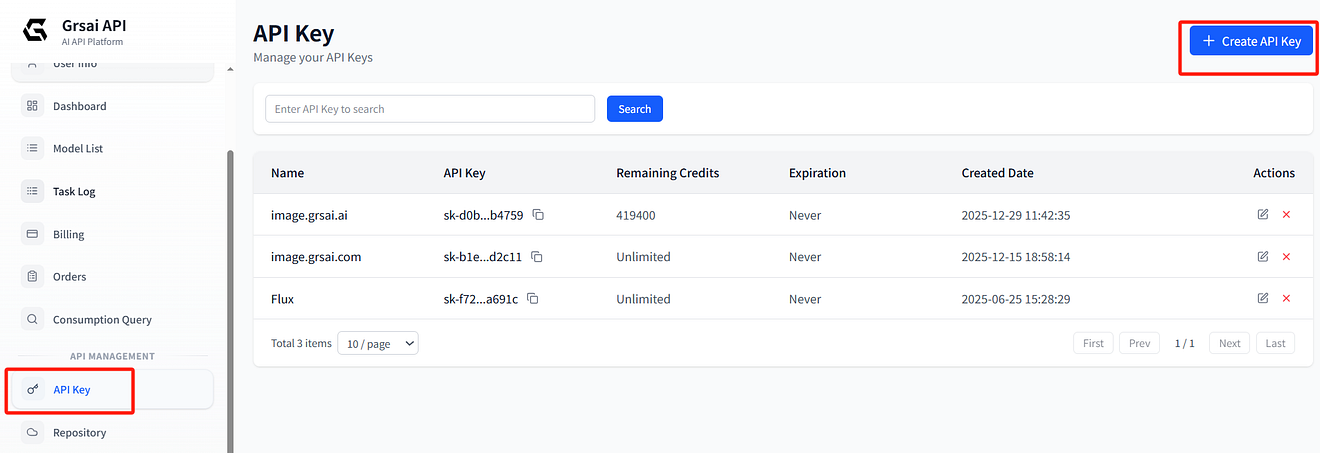
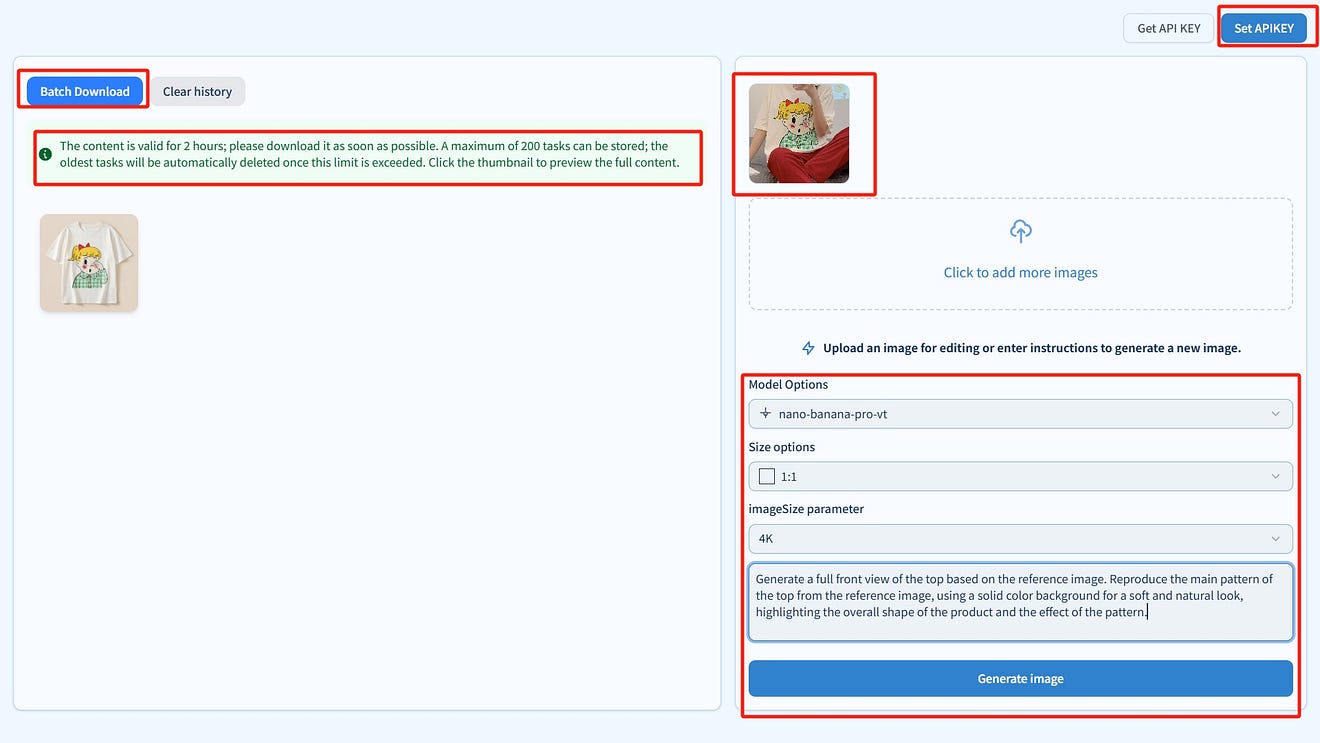
2. Configure the key: Fill it in the APIKEY section in the top right corner of image.grsai.com.
3. Batch submit tasks: In the interface, select the model (supports Sora2, Nano Banana Pro, gpt image 1.5, Veo, and other video/image models), upload images, select image size, enter prompts in the text box (for example: Generate a front overall display of the top based on the reference image, restore the full view of the top’s main pattern based on the reference image, solid color background, soft and natural, highlighting the overall shape and pattern presentation of the product.). Click generate.
4. Batch download: Since the system only saves content for two hours, download generated content as soon as possible after completion, supports one-click packaged download.
III. AI Large Model API Source Supply Station
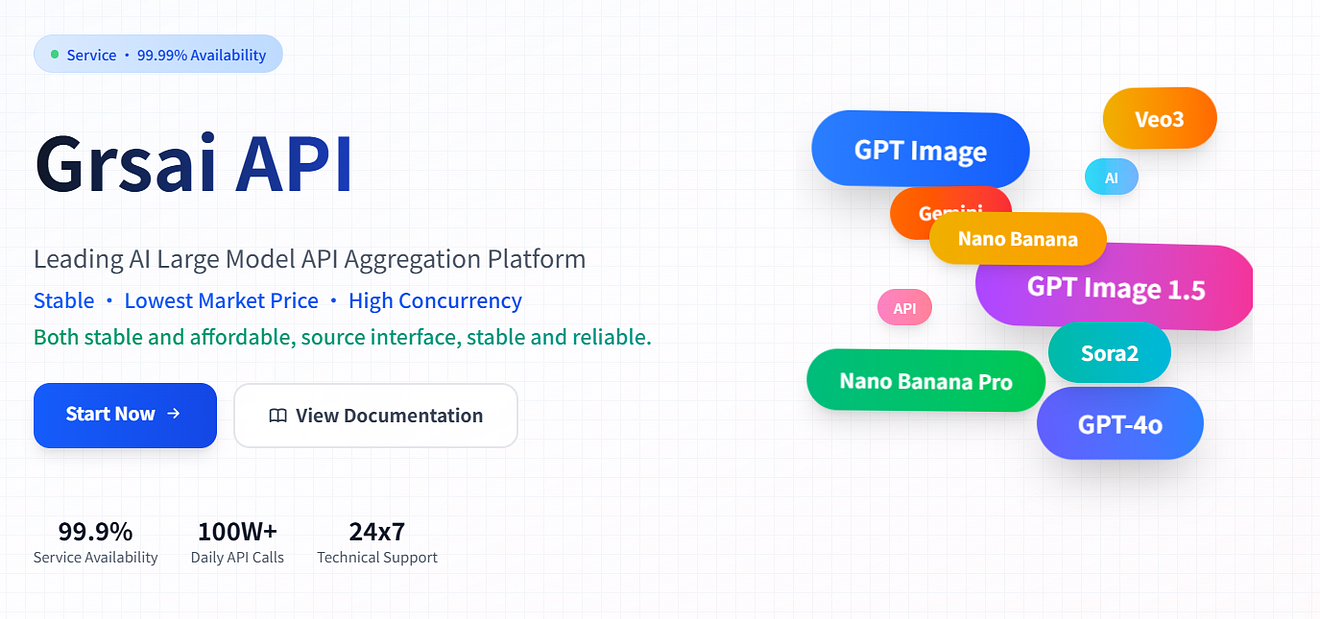
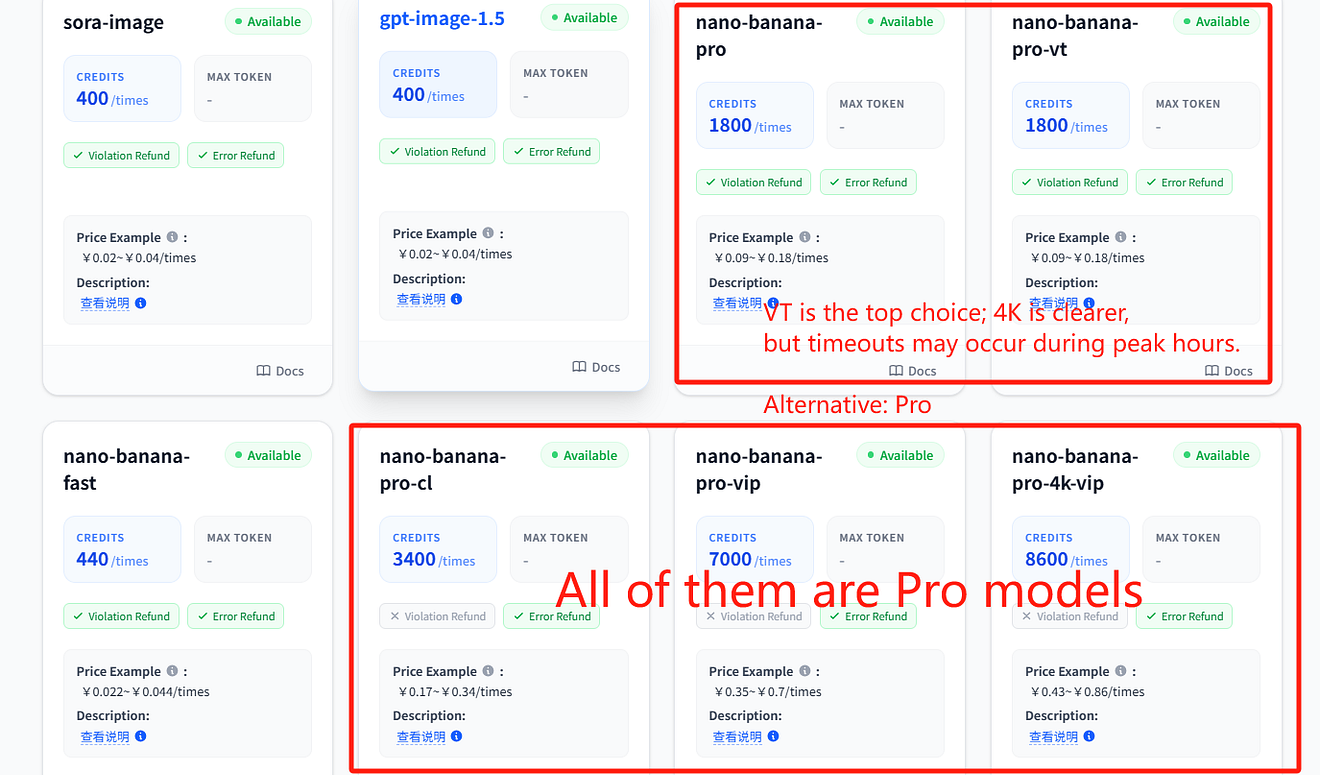
GrsAI (https://grsai.com ) as an aggregation platform and source supplier for AI large model APIs, its core value lies in providing stable, high-concurrency calling services at extremely low costs. For example, generating one Nano Banana Pro image costs about 0.134–0.24 USD via official API, while through GrsAI domestic direct connection, Nano Banana Pro 1k 2k 4k are all $0.09 USD per image, cost reduced by over 95%.
- High cost-effectiveness with multiple models: Not a reseller, no layers of intermediaries, the platform directly connects to model resources to achieve low prices. Nano Banana Pro — $0.09/image, gpt image 1.5–$0.02/image, Nano Banana —$ 0.022/image, Sora2–$0.08/video, Veo3.0/Veo3.1–$0.4/image, Gemini2.5/3.0….https://grsai.com/dashboard/models
- Supports high concurrency: Multiple top-configured domestic and international servers, supporting massive high concurrency calling demands.
- Domestic and international nodes: Provides domestic direct connection and international lines, ensuring low-latency access for global users.
- Platform storage library: Can directly upload image and video files to the storage library, thereby reducing server traffic costs.
- No deduction for failures: As long as it fails, instant refund, logs queryable, reducing your trial-and-error costs to zero.
Note: Images and videos are only saved on the platform for 2 hours; after that time, they cannot be viewed, please save promptly.
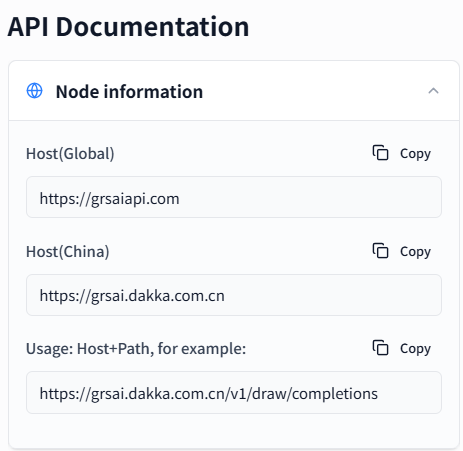
IV. GrsAI API High Concurrency Calling Nano Banana Pro Practical
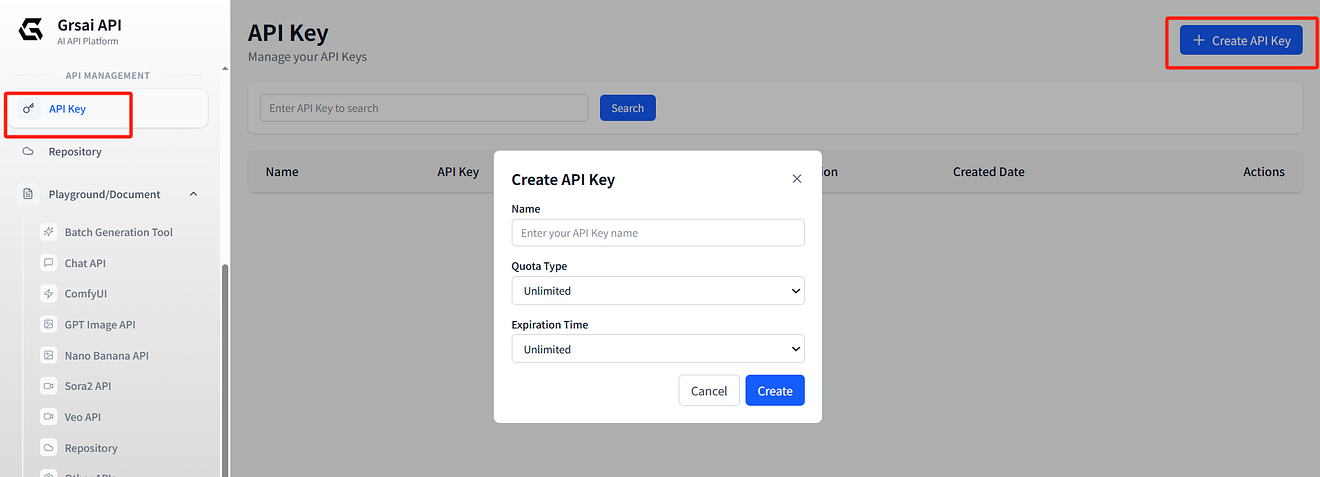
- Obtain GrsAI API Key: Log in to GrsAI console (https://grsai.com/dashboard/api-keys ), create and copy your key.
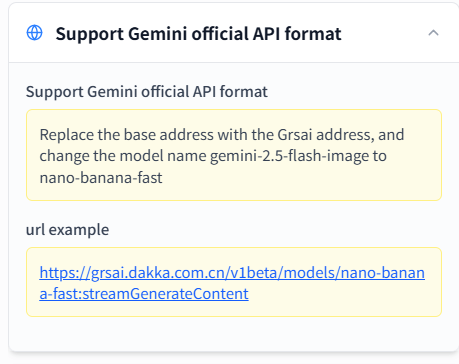
Nano Banana Pro supports Gemini official interface format
2. Install necessary Python libraries: We will use aiohttp for asynchronous HTTP requests, asyncio as the asynchronous runtime.
pip install aiohttp3.High concurrency calling API interface to generate images
Step 1: Create client class and initialization
First, we create a class to encapsulate all logic, including configuring API key, controlling concurrency number, and retry strategy.
import asyncio
import aiohttp
from typing import List, Dict, Any
import time

class NanoBananaBatchGenerator:
    """Nano Banana Pro High Concurrency Batch Generation Client"""

    def __init__(self, api_key: str, max_concurrent: int = 10, retries: int = 3):
        """
        Initialize client
        :param api_key: GrSAI API key
        :param max_concurrent: Maximum concurrency number, control request "flood peak"
        :param retries: Number of failure retries
        """
        self.api_key = api_key
        self.max_concurrent = max_concurrent
        self.retries = retries
        # Note: Here using Nano Banana Pro's dedicated endpoint
        self.endpoint = "https://api.grsai.com/v1/draw/nano-banana"
        self.session = None  # aiohttp session object, created later
Step 2: Implement asynchronous context management
To elegantly manage network connection resources (automatically create and close sessions), we implement asynchronous context manager.
async def __aenter__(self):
        """Asynchronous context manager entry, create reusable session and connection pool"""
        self.session = aiohttp.ClientSession(
            headers={
                "Authorization": f"Bearer {self.api_key}",
                "Content-Type": "application/json"
            },
            timeout=aiohttp.ClientTimeout(total=60)  # Set total timeout
        )
        return self

    async def __aexit__(self, exc_type, exc_val, exc_tb):
        """Asynchronous context manager exit, ensure session is closed"""
        if self.session:
            await self.session.close()
Step 3: Implement single request function with retry
This is one of the most core functions, responsible for calling a single API, with built-in exponential backoff retry mechanism to enhance robustness.
async def _generate_single_with_retry(self, prompt: str, params: Dict) -> Dict[str, Any]:
        """Execute single generation, built-in exponential backoff retry mechanism"""
        payload = {
            "model": "nano-banana-Pro",  # Specify model
            "prompt": prompt,
            **params  # Merge other parameters (such as size, reference image, etc.)
        }

        last_error = None
        for attempt in range(self.retries):
            try:
                async with self.session.post(self.endpoint, json=payload) as response:
                    if response.status == 200:
                        data = await response.json()
                        return {"status": "success", "data": data, "prompt": prompt}
                    else:
                        error_text = await response.text()
                        last_error = f"HTTP {response.status}: {error_text[:200]}"

                        # 429 error indicates too fast requests, use exponential backoff wait
                        if response.status == 429:
                            wait_time = 2 ** (attempt + 1)
                            print(f"Prompt '{prompt[:30]}...' triggered rate limit, retry after {wait_time} seconds...")
                            await asyncio.sleep(wait_time)
                            continue
                        elif response.status >= 500:
                            # Server error, retry later
                            await asyncio.sleep(1)
                            continue
                        else:
                            # Client error (such as parameter error) usually no need to retry
                            break

            except (asyncio.TimeoutError, aiohttp.ClientError) as e:
                last_error = str(e)
                await asyncio.sleep(1)  # Network exception, simple wait then retry

        # All retries failed
        return {"status": "failed", "error": last_error, "prompt": prompt}
Step 4: Implement batch generation main function
This function manages the entire batch process, using asyncio.Semaphore to control maximum concurrency, and asyncio.gather to execute all tasks concurrently.
async def generate_batch(self, prompts: List[str], **params) -> List[Dict[str, Any]]:
        """
        Batch generation main method
        :param prompts: Prompt list
        :param params: Additional API parameters, such as aspectRatio="16:9"
        :return: Generation result list
        """
        if not self.session:
            raise RuntimeError("Please use asynchronous context manager (async with) to call this client")

        # Create semaphore to strictly control maximum concurrency
        semaphore = asyncio.Semaphore(self.max_concurrent)

        async def bounded_task(prompt: str) -> Dict[str, Any]:
            async with semaphore:  # Only tasks that obtain "pass" can execute
                # Add tiny delay between requests to smooth traffic, avoid instant peaks
                await asyncio.sleep(0.05)
                return await self._generate_single_with_retry(prompt, params)

        print(f"Starting batch generation, total {len(prompts)} tasks, maximum concurrency {self.max_concurrent}...")
        start_time = time.time()

        # Create all asynchronous task objects
        tasks = [bounded_task(prompt) for prompt in prompts]
        # Concurrently execute all tasks and wait for them all to complete
        results = await asyncio.gather(*tasks, return_exceptions=True)

        elapsed_time = time.time() - start_time
        print(f"Batch generation completed! Total time {elapsed_time:.2f} seconds")

        # Uniformly process results, convert exceptions to formatted dict
        processed_results = []
        for i, result in enumerate(results):
            if isinstance(result, Exception):
                processed_results.append({
                    "status": "error",
                    "error": str(result),
                    "prompt": prompts[i]
                })
            else:
                processed_results.append(result)

        return processed_results
IV. Practical Use Case: Amazon E-commerce Product Image Set Generation
Now, let’s apply the above client to a real scenario: Batch generating a full set of images needed for an Amazon product page.
# ==================== Practical Use Case: Amazon E-commerce Product Image Set Generation ====================
async def main():
    """Practical case: Generate Amazon product image set for a smart coffee mug"""

    API_KEY = "your_grsi_api_key_here"  # Please replace with API Key provided by Grsai.com

    # Product core description
    product_desc = "a modern smart coffee mug with temperature display"

    # Build diverse prompt list needed for Amazon product page
    prompts = [
        f"{product_desc}, on a pure white background, professional product photography, Amazon main image",
        f"{product_desc}, on a wooden desk in a cozy home office, lifestyle shot",
        f"Close-up of {product_desc}'s LED screen showing 65°C, macro photography",
        f"A person's hands holding {product_desc} in a modern kitchen, action shot",
        f"{product_desc} shown next to a regular coffee mug for size comparison",
    ]

    # API call parameters
    generate_params = {
        "aspectRatio": "1:1",  # Square composition, suitable for e-commerce platforms
        "imageSize": "2K",            # Optional: Output size (1K, 2K, 4K)
        "urls": ["https://example.com/example.png"],  # Reference image
    }

    # Execute batch generation: Use async with to automatically manage client lifecycle
    async with NanoBananaBatchGenerator(API_KEY, max_concurrent=5) as generator:
        results = await generator.generate_batch(prompts, **generate_params)

        # Analyze and print results
        success_count = 0
        for i, result in enumerate(results):
            print(f"\nTask {i+1}: '{result['prompt'][:50]}...'")
            if result["status"] == "success":
                success_count += 1
                image_data = result.get("data", {})
                # Image URL usually located in data.results[0].url
                if "results" in image_data:
                    print(f"✅ Generation successful!")
            else:
                print(f"❌ Failed: {result.get('error')}")
        # Run main function
if __name__ == "__main__":
    asyncio.run(main())
Through the above breakdown, you can see how each step — from initialization, resource management, single request retry, to final batch scheduling — is designed.
**V. Using WebHook Callback to Process Results Method**
Suitable for decoupled backend task systems, you need a publicly accessible server to receive callbacks.
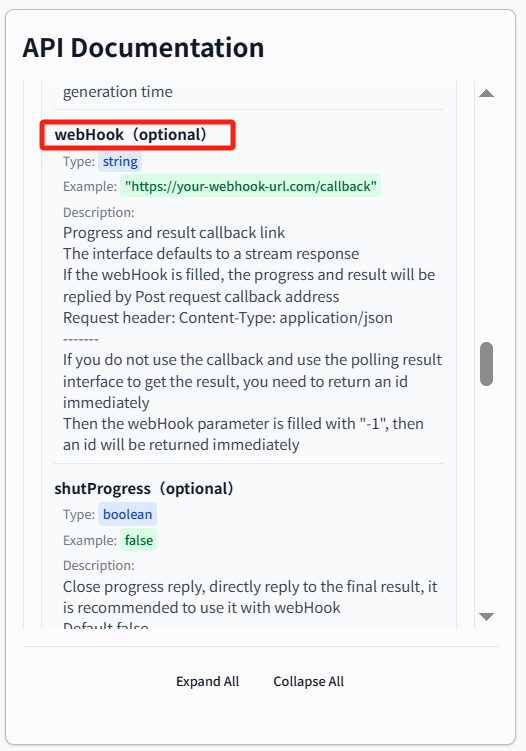
1. Request parameters: Set “webHook” to your server’s callback address. Can pair with “shutProgress”: true to make callbacks only send final results.
payload = {
    “model”: “nano-banana-pro”,
    “prompt”: “一只猫”,
    “aspectRatio”: “1:1”,
    “webHook”: “https://your-server.com/api/callback”, # Your callback address
    “shutProgress”: true  # Callback only receives final result, optional
}
2.Process callback: Your server needs to provide an interface that can handle POST requests.
# Simple example using Flask
from flask import Flask, request

app = Flask(__name__)
@app.route('/api/callback', methods=['POST'])
def handle_callback():
    data = request.json
    # Match your task by ID
    task_id = data['id']
    if data['status'] == 'succeeded':
        image_url = data['results'][0]['url']
        # Save URL or trigger subsequent operations
        print(f"Task {task_id} completed, image: {image_url}")
    return 'OK'  # Must return success response
3. First response: After submitting the task, the API will immediately return a JSON containing data.id (task ID), you need to save it to identify the corresponding task in the callback.
By accessing GrsAI API with extremely low costs combined with efficient scheduling of asynchronous concurrency, you can achieve unlimited batch generation of AI images and videos, improving creation efficiency and reducing costs.


评论
发表评论