Generate A+ pages in 3 minutes: Nano Banana Pro batch generation tutorial + prompt words + API integration guide
How To Create STUNNING A+ Content With Nano Banana Pro For Amazon KDP
On the Amazon platform, high-quality image sets (including main images, lifestyle images, detail images, etc.) are key to attracting buyers and boosting conversion rates. However, many cross-border sellers lack professional photography equipment, models, and post-editing capabilities, as well as design skills, making it difficult to quickly produce images. This results in unappealing product pages and stalled sales growth. Moreover, Amazon has strict image requirements — such as main images needing a pure white background, the product occupying at least 85% of the frame, and lifestyle images requiring real scenes — if non-compliant, listings can be rejected, and it may affect search rankings and ad delivery.
Nano Banana Pro is an advanced AI image generation and editing tool. Through natural language chat prompts, it can quickly create professional-grade product images. It supports 4K high-definition output, precise text rendering, and semantic editing, perfectly suited for generating Amazon image sets.
Below, based on the NanoBananaPro model provided by Grsai, combined with Amazon image guidelines and examples, I share complete prompt sets to help you generate images quickly.
I. Amazon E-commerce Image Set Prompts
On e-commerce platforms like Amazon, the presentation of product images is one of the core factors determining conversion rates. A professional, compliant, and attractive set of product images can efficiently convey product information and selling points, quickly build consumer trust, spark purchase desire, and directly drive sales growth. Image sets typically include main images, lifestyle images, infographics, size charts, etc. When using, simply input the prompt directly into the Nano Banana Pro model and upload the product photo as a reference image.
1.Main Image (Hero / Main Image, Pure White Background)

Generate a professional Amazon main image. Using the precise appearance of the product from the reference image, a realistic rendering is performed, preserving true colors, proportions, and details. The product is placed in the center of the frame, occupying at least 85% of the space, against a pure white background (RGB 255,255,255). Professional studio lighting is used, with soft, natural shadows, high-brightness illumination, and sharp global focus. No additional props, text, logos, or elements are included. The result is a clean, minimalist, business e-commerce style with ultra-high detail and 4K resolution.
2.Lifestyle Image (Lifestyle Image, Real Usage Scenarios)

Generate an Amazon lifestyle image based on the provided reference image. The image automatically infers the most suitable target users, environment, and benefit presentation method based on product appearance and typical uses. The product must be clearly visible and centered, with natural lighting, realistic proportions and shadows, a comfortable or efficient atmosphere, an overall realistic style, high detail, no text overlays, and a professional Amazon A+ content style.
3.Infographic Generation Prompt (Key Features / Benefits Overview Infographic highlighting features, with icons or labels)

Based on the product in the reference image, generate an Amazon product infographic. Analyze the product’s usage scenarios and core functional technologies, and generate a key selling point using a large title in the top white space. Use minimalist arrows to label 2–3 brief material features of the product, leaving natural white space for adding text/labels. The style should be modern and minimalist, with a soft, light gradient background. Use soft studio lighting to eliminate shadows, and achieve 8K resolution for photorealistic results.
4.Multi-Angle or Different Color Images Prompt

Based on the product in the reference image, generate one image each: 【front view, side view, back view, and top view】. White background, professional lighting, and photos must be taken strictly according to the proportions shown in the attached image. No modifications to the product design are permitted.
5.Scene Images (Multi-Scene / Usage Scenarios Grid)

Generate an Amazon infographic grid based on the products in the reference images, showcasing multiple real-world usage scenarios for the products in the attached reference photos. Automatically identify 4–6 suitable life scenarios and corresponding benefits based on product type and appearance. Arrange small, realistic scene images in a grid or collage format, with each scene subtly overlaid with brief text describing the benefits or context. Natural lighting ensures clear product visibility in each scene, maintaining a consistent style and high detail, suitable for Amazon product detail pages.
6.Material & Craftsmanship Infographic

Generate a detailed Amazon infographic based on the product in the reference image, focusing on materials and craftsmanship. The product is centrally positioned and rendered realistically. Key craftsmanship features are automatically analyzed and highlighted based on visible textures, surface finishes, structural details, seams, and materials. Include zoom-in images, arrows, or labels, along with concise descriptive text (all derived from product analysis). Clean layout, subtle icons, white background, and ultra-sharp text and details create a professional product presentation style.
7.Dimensions / Specs Infographic

Generates an Amazon-compatible size chart based on the product in the reference image. The product is centered, and parameters such as height, width, depth, weight, and capacity are automatically and concisely labeled based on visible or logical dimensions. Typical specifications for the product type are included. Features a minimalist background, sharp lines, and a readable sans-serif font; realistic rendering; high precision; and an e-commerce optimized style.
II. Amazon Product Detail Page (A+) Image Set Prompts
In the highly competitive Amazon marketplace, when your product looks similar to others, the A+ page is often the key factor in whether you can sell at a higher price and maintain stable conversions. Through multi-module visual content, it transforms the product from a mere functional description into a presentation of lifestyle and emotional resonance. Excellent A+ pages typically include the following core modules: brand positioning banner, lifestyle usage scenarios, core selling points section, product detail breakdown, and emotional closing call-to-action.
The prompts below are universal and applicable to products in different categories. Simply upload the corresponding reference image to use them directly. If you want more precise copywriting content, you can add or modify the prompts yourself to achieve a more expected effect.
1.Brand Positioning Banner
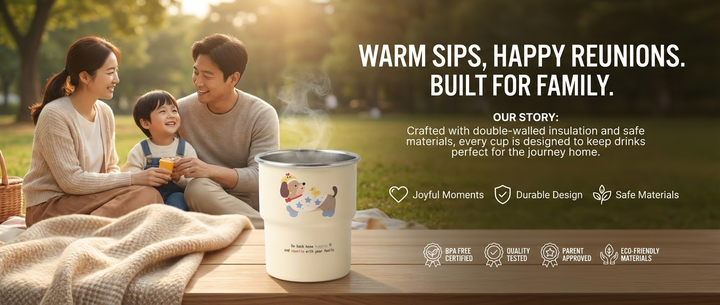
Based on the product in the reference image, generate a brand banner for an Amazon A+ page, serving as a reinforcement area for the brand story and positioning. The image primarily uses a wide, horizontal composition, with the core objective of conveying brand depth through a fusion of visuals and text. This includes a slogan, a short story about the founder/craftsmanship (1–2 brief sentences), core brand values (presented using 1–3 very concise phrases or icons), and honor/certification icons (3–5 small, exquisite icons). A lifestyle scene image serves as the background, with a short text area overlaid in the foreground (text blocks centered or slightly to the right, modern and concise font, white/brand color scheme, ample white space to avoid overwhelming the image). The title is the largest and most prominent, while the remaining content is arranged naturally with subheadings, short text, and icons. The overall design is minimalist, clean, symmetrical, and balanced, with consistent and soft lighting. This high-resolution professional e-commerce banner design avoids excessive text and creates a professional, warm, trustworthy, and realistic atmosphere.
2.Core Selling Points Section

Based on the product in the reference image, generate a core selling point module image for an Amazon A+ page. A concise and powerful main title highlighting the product’s core selling points is centered at the top. A full, high-resolution, upright image of the product’s front is placed in the center, without cropping, featuring natural, soft lighting and textural reflections. Surrounding this are 3–5 small, exquisite rectangular or rounded corner selling point cards. These cards are compact, understated, and have extremely thin or no borders. Each card contains minimalist icons paired with a minimalist, precise selling point title and a very short description, naturally generated by AI based on the product’s materials, technology, and design characteristics. The brand’s primary color is used for subtle emphasis. The overall layout is minimalist, clean, symmetrical, and modern, with a pure white background. The product is centered and occupies the largest portion of the page, with no overlapping cropping or unnecessary decorations. High-resolution professional e-commerce design ensures natural and realistic lighting, and the card content precisely focuses on core technological advantages.
3.Lifestyle / Usage Scenario Module
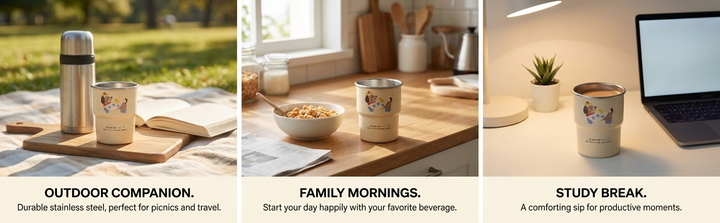
Based on the product in the reference image, generate a lifestyle/usage scenario module image for an Amazon A+ page. Place 3–4 high-resolution, realistic lifestyle photos horizontally side-by-side (uniform size, consistent spacing, borderless or very thin borders). Each photo showcases the product in its natural state in different everyday/outdoor scenarios, with the product fully integrated into the environment and lighting (placed appropriately, seamlessly blending with the background, and with natural and consistent shadows/reflections, avoiding stiff placement or a post-processed look). Below each photo, or lightly overlay a minimalist English selling point title and a short descriptive text (naturally generated based on the product’s actual function and usage context, with functional technical details and a slight connection to the scene, and minimal text overall). The overall color scheme should be warm and natural, with perfectly consistent lighting. The layout should be minimalist, clean, symmetrical, and balanced, with a pure white or light-colored background transition. High-resolution professional e-commerce page design, without overlapping cropping or unnecessary decorations, creating a relaxed, realistic, and immersive atmosphere.
4.Product Detail Display Module

Generate an Amazon A+ technical parameter detail image based on the reference image. Core objective: To eliminate user doubts and build trust through extremely clear details. Image layout: Use an exploded view of product components [elements can be specified]. Infographic style: Use thin leaders to point from product components to floating feature labels. Label design description: A minimalist rectangular label box containing simple icons, concise titles, and detailed descriptions of functions, technologies, capabilities, and materials; the label style is clean and modern, and the border and accent colors must be consistent with the product’s color scheme. Background: Minimalist solid color to emphasize professionalism. Style: Hardcore, objective, high-fidelity photography style.
5.Closing Module

Generate a closing module image for an Amazon A+ page based on the product in the reference image. Wrap the product within a border or background in the brand’s color scheme. At the top or center, generate a concise, emotionally resonant purchase reason statement. Below, display a high-definition, warm-hearted lifestyle scene image (the product blends naturally). Overlay brand emotional elements on the image: small icons and the core slogan on the left or top, and circular/square data labels (displaying philanthropic or impact data) on the right or bottom. The text area includes short paragraphs on emotional value, long-term value, and action suggestions. The text is modern, concise, white/high-contrast, and has ample white space. The overall style is minimalist, clean, symmetrical, balanced, and modernly sophisticated. The product’s lighting and shadows blend naturally and softly into the image, encouraging purchase. All text is in large, clear, eye-catching, bold, and high-contrast font.
III. AI Image Editing Prompts
Reverse-engineer prompts from reference images: Upload the reference image to the AI and have it generate text-to-image instructions! Delete or modify the description of the main subject elements in the prompt.
Based on the reference image I provided, analyze the image content and generate a detailed text prompt, including key elements, characters, actions, scenes, composition, color tones, image style, background elements, and text features. It should guide AI image generation tools to create similar works, within 300 words.
Change Background

On the basis of the original image, retain the cup as the main subject, in Japanese fresh style, mid-shot focusing on a warm home desktop. On a wooden table, place the cup on a beige knitted placemat, next to a vintage film camera, a white vase (with eucalyptus leaves), and a beige envelope. The background is beige gauze curtains. Warm color tones, mainly wood brown, beige, gray-green, with a healing and refined texture, soft and bright lighting and shadows; creating a Japanese home still-life photography atmosphere.

On the basis of the original image, retain the cup as the main subject, change the background to Japanese fresh & ins good stuff sharing style, using soft natural light (simulating side light from large Japanese linen curtains), composition using classic Xiaohongshu 45-degree overhead or eye-level close-up perspective. On a beige-brown knitted blanket, casually place frosted glass scented candles, books, a wooden calendar, a woven tray holding white and cream tulips, next to a white throw pillow. Warm tones, mainly beige-brown and cream white, delicate texture, full of life ritual feeling, softly blurred background, highlighting the layering and details of the main items, clear and natural text elements, making the image richer with a sense of life, but not cluttered, soft highlights, clean shadows with airy feel. Avoid looking stiff like an advertisement. Style: premium, refined lifestyle, authentic sharing feel.
Image Retouching

Based on the provided reference image, generate a refined Amazon e-commerce product retouched image. 1. Composition & Correction: Correct perspective. Even if the reference image is tilted or handheld, ensure the subject is perfectly upright and centered. Remove hands and background clutter. Front-facing perspective; 2. Ground & Shadows: Do not let the object appear floating. Create realistic natural contact shadows and add soft projected shadows at the bottom of the product. The object must look like it is firmly placed on a pure white surface; 3. Smart Retouching: Perform surface cleaning. Remove dust, scratches, and noise. Enhance the inherent physical texture of the subject (gloss, matte, or metallic feel); 4. Lighting & Dimension: Use studio lighting. Enhance specular highlights on the upper part of the product and blocking shadows to maximize 3D dimensionality; 5. Quality: 8K resolution, sharp edges, meeting commercial photography standards.

IV. Nano Banana Pro Batch Image Generation Tutorial
For Amazon operations, product listing is a core part, and the demand for quickly and massively generating image assets is particularly prominent. Nano Banana Pro’s unique advantages in character consistency, multi-image fusion, and precise natural language understanding perfectly meet this need efficiently, allowing e-commerce businesses to easily produce series image sets with unified style and premium quality.
Companies can choose to integrate the Nano Banana Pro source API to build a batch image generation tool to assist operations. If there is no development capability, you can directly use the batch image generation tool and cost-effective API provided by GrsAI at (image.grsai.com) to establish a “image generation pipeline” for batch creation.
- Core Advantages
Unlimited batch generation & high concurrency: image.grsai.com has no concurrent request limit, meaning you can submit dozens or even hundreds of generation tasks at the same time, letting them process in the background queue without waiting, greatly reducing wait time and enabling batch downloads.
High cost-effectiveness: As the source API provider, prices from GrsAI are far lower than official channels. Nano Banana — $0.022 per image. More powerful Nano Banana Pro — $0.09 per image, plus Gpt-image-1.5 — $0.02 per image, sora2 — $0.08 per clip, Veo, and other models.
- Configuration and Usage Tutorial
Obtain API Key:
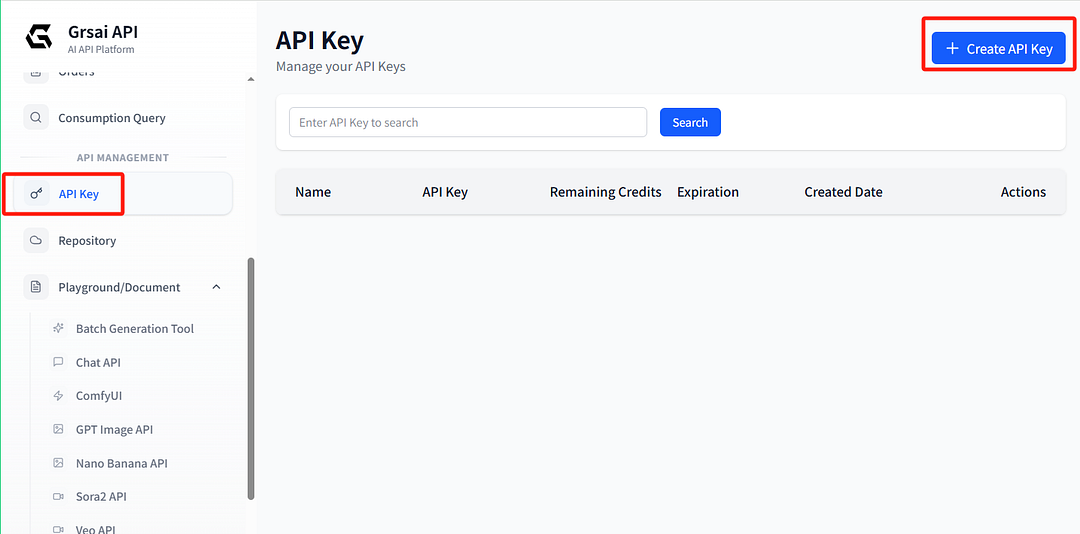
- Visit Grsai: https://grsai.com/dashboard/api-keys
- In the sidebar, find “API Keys”, create a new key and copy it.
Configure the online tool:
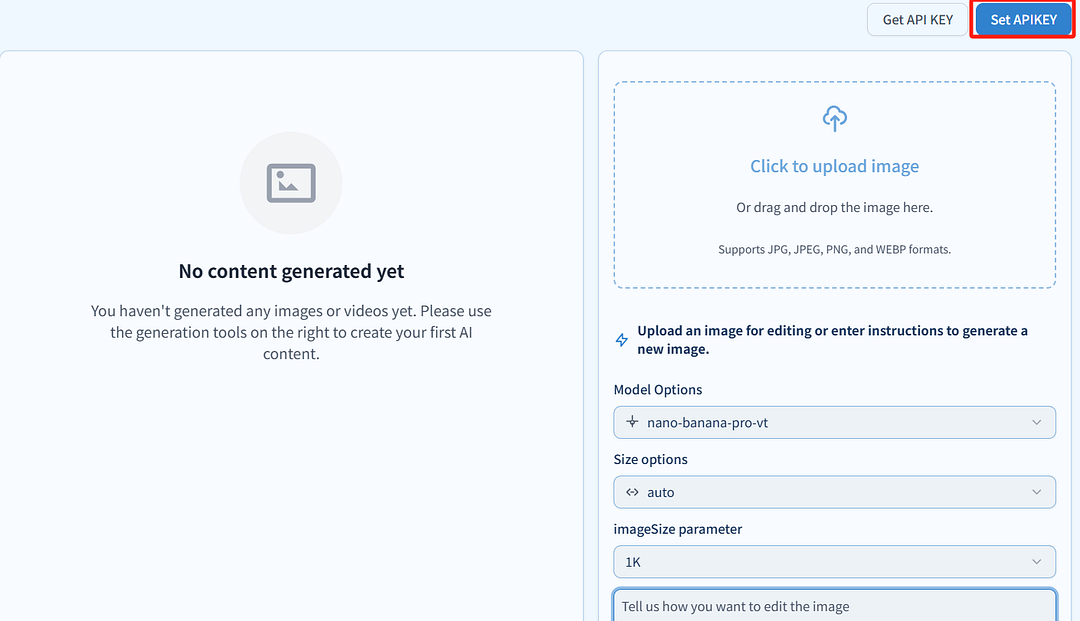
- Open the batch image generation tool: image.grsai.com
- In the top right corner of the website, find “Set API Key” and paste your copied API key.
Generate:
- Select the model, upload reference image(s), input prompt, and generate in batch. There is no concurrency limit, but note that the page only keeps 200 images — older tasks are automatically deleted when exceeded, so download quickly.
- Development Integration Practical Code
Developer documentation: https://grsai.com/dashboard/documents/nano-banana
import requests
# 1. Request headers
headers = {
    "Content-Type": "application/json",
    "Authorization": "Bearer YOUR_GRSAI_API_KEY"  # Replace with your API Key
}
# 2. Request body parameters
payload = {
    "model": "nano-banana-pro",  # Specify model
    "prompt": "日落时分的未来城市,飞行汽车穿梭,霓虹灯牌上有清晰的中文",  # Prompt
    "aspectRatio": "16:9",       # Image aspect ratio, options: 1:1, 16:9, 9:16, 4:3, 3:4, etc.
    "urls": [],                  # Optional, list of reference image URLs
    "webHook": "-1"              # Set to "-1" to return task ID immediately for polling results
}
# 3. Initiate request (generation interface)
response = requests.post(
    "https://grsai.dakka.com.cn/v1/draw/nano-banana",  # Domestic interface link
    json=payload,
    headers=headers
)
# 4. Get task ID and poll for results
if response.status_code == 200:
    task_id = response.json().get("id")

    # Poll for results (example)
    result_payload = {"id": task_id}
    result_response = requests.post(
        "https://grsai.dakka.com.cn/v1/draw/result",  # Result query interface
        json=result_payload,
        headers=headers
    )
    print(result_response.json())  # Returns result containing image URL (valid for 2 hours)
else:
    print("Request failed:", response.status_code, response.text)
V. Notes & Best Practices
- Save results promptly: Image/video links generated via API or online tool are valid for only 2 hours. Be sure to download them to local storage in time.
- Instant refund on failure: If image generation fails, credits are refunded instantly.
By combining Nano Banana Pro with GrsAI’s batch image generation tool, you can establish a stable, efficient, and low-cost batch generation pipeline.


评论
发表评论