How to Use Nano Banana 2 API: Cheapest Gemini Image Generation at $0.065/Image + Full Code Examples
Nano Banana 2 API Guide: Ultra-Fast 4K Image Generation with Gemini 3.1 Flash — Only $0.065/Image
Nano Banana 2 Officially Released: Google’s “Cost-Performance Revolution” in Image Generation
Google really loves quietly releasing new models in the middle of the night. Right after Google DeepMind released Gemini 3.1 Pro, they launched another new model — Nano Banana 2 (Gemini 3.1 Flash Image). Nano Banana 2 is not just a simple iteration; Google has combined Pro-level studio-grade creative capabilities with Flash-level lightning speed, completely solving the pain point of “high quality means slow, high speed means blurry.” It has become the current best cost-performance image generation and editing model!

In practical applications, Nano Banana 2’s response speed far exceeds Nano Banana Pro, while the image output resolution has been upgraded from the previous generation’s 2K to a maximum of 4K, capable of handling more complex prompt content.
This article deeply analyzes the model’s upgrade highlights and includes the official Gemini calling methods as well as the calling methods and ordinary user tutorials via the AI large model source API Grsai. Whether you’re an ordinary user or a developer, you’ll find the most suitable way to get started.
Capability Leap: From “Looks Like Something” to “Precise Expression”
The upgrade from Nano Banana Pro to Nano Banana 2 mainly focuses on the following three dimensions:
- Image quality and details maxed out: Supports native 4K output, more natural lighting and shadows, richer textures, clearer details. Chinese text rendering has been greatly improved, almost eliminating garbled characters; complex prompt understanding capability has significantly improved, strictly following user instructions.

- Subject consistency: For designers who need character consistency, “face swapping” has always been a pain point. Nano Banana 2 has made a significant breakthrough in this area: it supports maintaining high feature consistency across up to 5 characters and can achieve high-fidelity presentation of up to 14 objects fused in a single image, without worrying about inexplicable “face changes.”


- Real-time search for world knowledge: Integrated with Gemini’s real-time search and vast knowledge base, generated content is more grounded in reality and better aligned with current events.
- Stronger editing capabilities: For developers, Nano Banana 2 brings not only performance improvements but also high controllability. The new model adds multi-level resolution options from 512px to 4K, as well as ultra-wide aspect ratios such as 4:1, 1:4, 8:1, etc. Among them, the 512px low-resolution tier is specially designed for high-concurrency, low-latency scenarios, suitable for rapid iteration or generating thumbnails.

Nano Banana 2 API Calling in Practice
Official Channels
Google has officially opened Nano Banana 2 calling through Google AI Studio and Gemini API. Nano Banana 2’s image generation price is $0.0672 per image, which is half the price of Nano Banana Pro ($0.134 per image).
- Go to https://aistudio.google.com/ or the Vertex AI console
- Create an API Key
- Install SDK: pip install google-genai
from google import genai
from google.genai import types
import PIL.Image
from io import BytesIO

client = genai.Client(api_key="YOUR_API_KEY")
response = client.models.generate_content(
    model="gemini-3.1-flash-image-preview",  # Nano Banana 2 official model ID
    contents=["Generate a 4K image of a futuristic cyberpunk city at night, neon lights reflecting on wet streets, flying cars zooming by"],
    # When supporting image-to-image editing, add parts=[types.Part.from_bytes(...)]
)
for part in response.candidates[0].content.parts:
    if part.inline_data:
        image = PIL.Image.open(BytesIO(part.inline_data.data))
        image.save("nano_banana_2_output.png")
        print("Generation complete!")
Gemini Source API — Grsai API
Grsai API (https://grsai.com) as a mainstream overseas AI model source aggregation platform, Grsai removes intermediate links and offers lower prices than official. For domestic developers facing network latency and high-concurrency issues when directly connecting to Google API, Grsai provides high-concurrency support, instant failure fallback guarantee, model effects consistent with official, and compatible with Gemini format calling, greatly reducing your total cost of ownership.
- Nano Banana 2 price: $0.065 per image
- Failure refund: Calls that fail or violate rules refund credits without deduction
- High-concurrency support: Supports high-traffic products and high-concurrency requests
- Storage repository: Upload resources to Grsai’s storage repository to save traffic, currently supports storage platforms including Qiniu Cloud, Alibaba Cloud, Tencent Cloud, Cloudflare.
- More popular models: Nano banana pro — $0.09 per image, Nano banana — $0.022 per image, Gpt image 1.5 — $0.02 per image, Veo3.1/Veo3.0, Gemini 3.1 pro, Gemini 3.0 pro, Gemini 2.5 pro
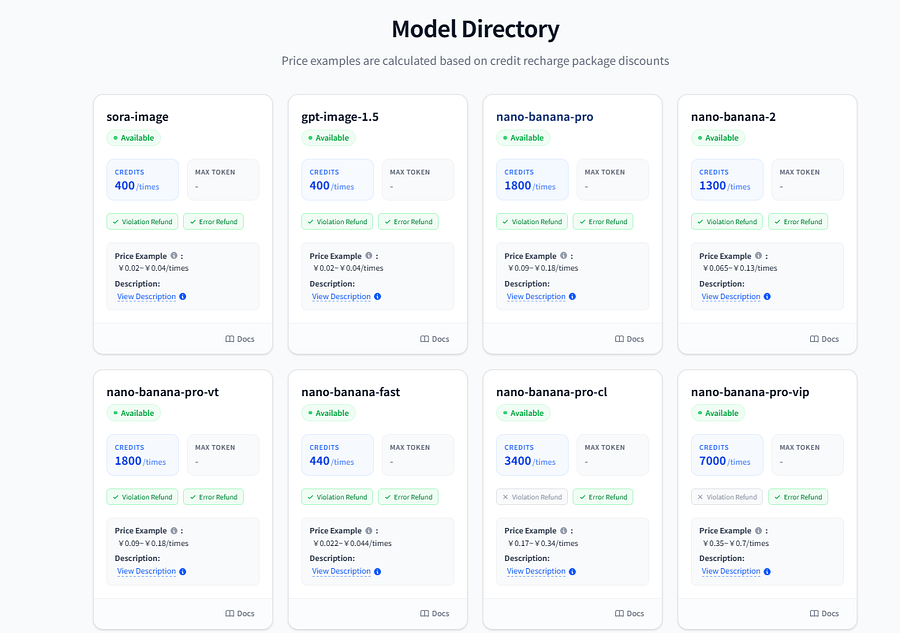
Nano Banana 2 API Calling in Practice
Grsai’s Nano banana unified calling method — switching models only requires changing the model name to match the backend.
1.View API documentation to access the model
- Visit Grsai official website https://grsai.com
- Create API key: https://grsai.com/dashboard/api-keys
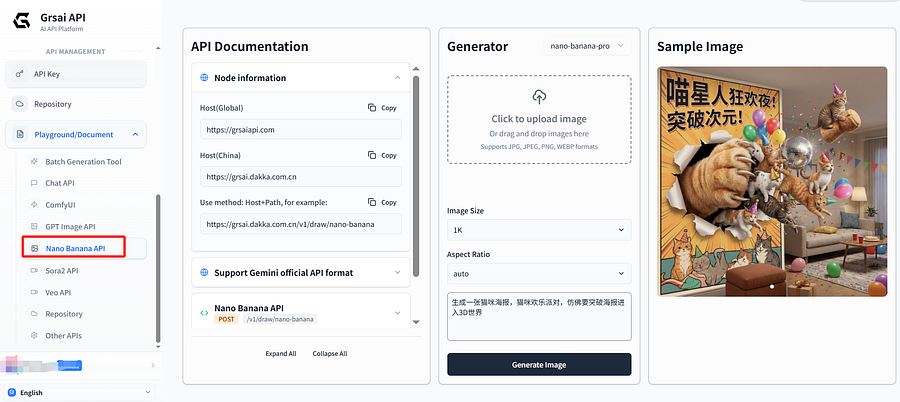
2.API Calling Instructions
Node information
- Overseas node: https://api.grsai.com
Interface address: POST /v1/draw/nano-banana
Request headers configuration
headers = {
    "Content-Type": "application/json",
    "Authorization": "Bearer YOUR_API_KEY"
}
Python code example
import requests
import time

# Configuration information
url = "https://grsaiapi.com/v1/draw/nano-banana"
headers = {
    "Content-Type": "application/json",
    "Authorization": "Bearer APIKEY"  # Replace APIKEY with your key, generated in console
}
# Request parameters - Nano Banana 2 model
payload = {
    "model": "nano-banana-2",  # Model names: nano-banana-pro, nano-banana-2, nano-banana
    "prompt": "A cat wearing an astronaut suit drinking coffee on the moon, cinematic quality, 4K HD",
    "aspectRatio": "16:9",  # Supports ratios like 1:1, 16:9, 9:16, 4:3, 3:4 etc.
    "urls": [],  # Optional, reference image URLs
    "webHook": "-1"  # Set to "-1" to return task ID immediately for polling
}
# Send request
response = requests.post(url, json=payload, headers=headers)
task_data = response.json()
print(f"Task ID: {task_data['id']}")
# Poll for results
result_url = "https://grsaiapi.com/v1/draw/result"
result_payload = {"id": task_data['id']}
while True:
    result_response = requests.post(result_url, json=result_payload, headers=headers)
    result = result_response.json()

    if result['progress'] == 100:  # Generation complete
        print("Generation successful!")
        for img in result['results']:
            print(f"Image URL: {img['url']}")  # URL valid for 2 hours [citation:2]
        break
    elif result['status'] == 'failed':
        print(f"Generation failed: {result['failure_reason']}")
        break
    else:
        print(f"Generating... Progress: {result['progress']}%")
        time.sleep(2)  # Query every 2 seconds
After successful calling, the system returns a task ID, which you can use to obtain generation results via polling or webHook. Detailed result query code can be found in Grsai’s official documentation.
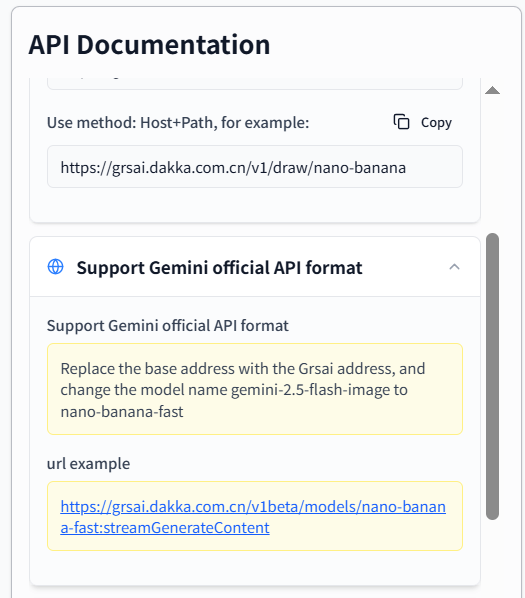
3.Compatible with Gemini official format
Grsai’s interface also supports Gemini official format. If you’ve been using the official API before, simply:
- Replace the base URL with Grsai’s node address
- Change the model name to the corresponding Grsai model name (e.g., nano-banana-2, nano-banana-pro….) Example: https://grsaiapi.com/v1beta/models/nano-banana-2:streamGenerateContent
- Call the model according to the official development documentation: https://ai.google.dev/gemini-api/docs
Ordinary User Tutorial
Grsai provides a free batch generation tool — ordinary users can also use Nano Banana 2 by simply configuring the Grsai API key.
- Generation failures automatically refund credits, no worry about waste
- All generation records logged for anytime viewing and download (valid for two hours)
- Supports high concurrency, can quickly complete hundreds of images
Visit Image.grsai.ai, Grsai’s open-source batch generation tool specially provided for ordinary users, for online use of Nano Banana 2 for batch image generation and download operations.
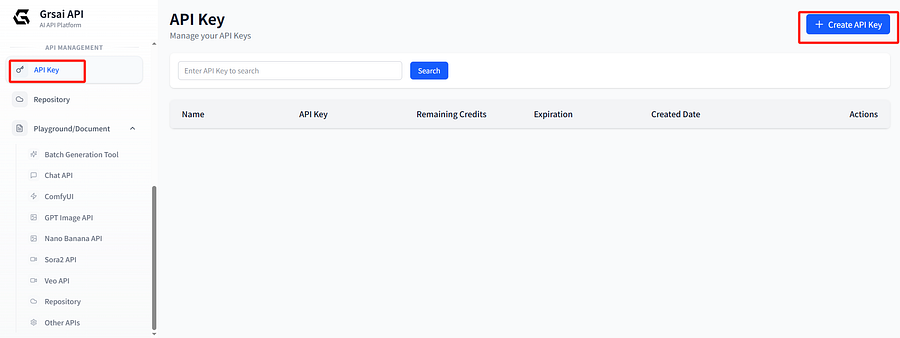
1.Generate an API key in Grsai console, copy it
2.Open Image.grsai.com, paste the API key in the top right corner
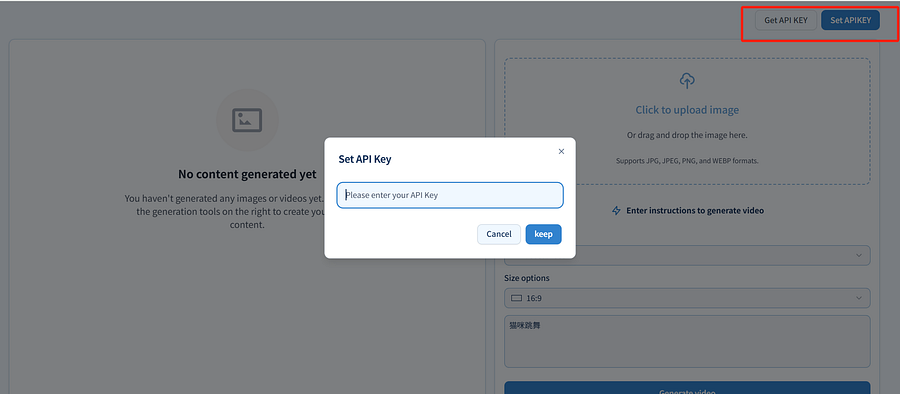
3.Select the model, input the prompt, and generate
Summary
Nano Banana 2’s move is incredibly aggressive — directly slashing prices, maxing out speed, making it something you can’t live without once you start using it. Pro-level image quality + Flash-level speed + halved price — this combo has become the optimal production tool choice for most designers.
For developers, costs are significantly reduced, allowing lower per-user prices to be more acceptable. If you want the absolute best cost-performance for Nano Banana 2 API with smooth domestic access, aggregation platforms like Grsai have everything arranged clearly for you. Anyway, no matter which path you take, Nano Banana 2’s capabilities are already in front of you — now it’s up to you to decide what to do with it.


评论
发表评论